
CDXG3200UV - Car stereo SONY - Free user manual and instructions
Find the device manual for free CDXG3200UV SONY in PDF.


| Product type | Car stereo |
| Brand | Sony |
| Model | CDXG3200UV |
| Dimensions | 178 mm × 50 mm × 177 mm (W × H × D) |
| Weight | 1.2 kg |
| Power supply | 12 V DC, negative ground |
| Rated current consumption | 10 A |
| Max output power | 55 W × 4 (at 4 Ω) |
| Radio frequency ranges | FM 87.5‑108 MHz (Europe) / MW 531‑1602 kHz / LW 153‑279 kHz |
| Audio sources | CD, USB, AUX (stereo mini jack), radio tuner |
| Playable audio formats | MP3, WMA, FLAC (CD/USB) |
| Equalizer | 10 presets + customizable (32 Hz‑500 Hz, −6 dB to +6 dB) |
| RDS functions | AF, TA, PTY, CT, Regional |
| Extra Bass | 3 modes: 1, 2, OFF |
| Display | Customizable backlight (15 colors + 1 custom), brightness adjustment |
| Connectivity | USB port (1 A max), AUX input 3.5 mm, wired steering wheel control |
| Security | Detachable front panel, warning alarm, auto-off (30 min) |
| Maintenance | Clean connectors with cotton swab |
| Repairability | Replaceable fuse (10 A), firmware update via USB |
| Compatibility | iPod/iPhone, Android smartphones (AOA 2.0), USB MSC/MTP devices |
Frequently Asked Questions - CDXG3200UV SONY
User questions about CDXG3200UV SONY
0 question about this device. Answer the ones you know or ask your own.
Ask a new question about this device
Download the instructions for your Car stereo in PDF format for free! Find your manual CDXG3200UV - SONY and take your electronic device back in hand. On this page are published all the documents necessary for the use of your device. CDXG3200UV by SONY.
USER MANUAL CDXG3200UV SONY
FM/MW/LW Compact Disc Player
CD-пponгьВаTeь CBCTpoeHHbIM FM/MW/LW-THHePOM
FM/MW/LW nporpaBaay KOMnakT DnCKiB
To cancel the demonstration (DEMO) display, see page 10.
For the connection/installation, see page 21.
Operating Instructions GB
For safety, be sure to install this unit in the dashboard of the car as the rear side of the unit becomes hot during use. For details, see "Connection/Installation" (page 21).
Made in Thailand
Laser Diode Properties
- Emission Duration: Continuous
- Laser Output: Less than 53.3 W
(This output is the value measurement at a distance of 200mm from the objective lens surface on the Optical Pick-up Block with 7 mm aperture.)
The nameplate indicating operating voltage, etc., is located on the bottom of the chassis.
CE
Hereby, Sony Corporation declares that this equipment is in compliance with Directive 2014/53/EU.
The full text of the EU declaration of conformity is available at the following internet address:
http://www.compliance.sony.de/
This equipment is intended to be used with the approved version(s) of software that are indicated in the EU Declaration of Conformity.
The software loaded on this equipment is verified to comply with the essential requirements of the Directive 2014/53/EU. Software version: 1_
The software version can be checked in the firmware setup item of the general setup menu.
Notice for customers: the following information is only applicable to equipment sold in countries applying EU Directives
Manufacturer: Sony Corporation, 1-7-1 Konan Minato-ku Tokyo, 108-0075 Japan For EU product compliance: Sony Belgium, bijkantoor van Sony Europe Limited, Da Vincilaan 7-D1, 1935 Zaventem, Belgium
Disposal of waste batteries and electrical and electronic equipment (applicable in the European Union and other European countries
with separate collection systems)
This symbol on the product, the battery or on the packaging indicates that the product and the battery shall not be treated as household waste. On certain batteries this symbol might be used in combination with a chemical symbol. The chemical symbols for mercury (Hg) or lead (Pb) are added if the battery contains more than 0.0005% mercury or 0.004% lead.
By ensuring these products and batteries are disposed of correctly, you will help prevent potentially negative consequences for the environment and human health which could otherwise be caused by inappropriate waste handling. The recycling of the materials will help to conserve natural resources.
In case of products that for safety, performance or data integrity reasons require a permanent connection with an incorporated battery, this battery should be replaced by qualified service staff only.
To ensure that the battery and the electrical and electronic equipment will be treated properly, hand over these products at end-of-life to the applicable collection point for the recycling of electrical and electronic equipment.
For all other batteries, please view the section on how to remove the battery from the product safely. Hand the battery over to the applicable collection point for the recycling of waste batteries.
For more detailed information about recycling of this product or battery, please contact your local Civic Office, your household waste disposal service or the shop where you purchased the product or battery.
Warning if your car's ignition has no ACC position
Be sure to set the AUTO OFF function (page 10). The unit will shut off completely and automatically in the set time after the unit is turned off, which prevents battery drain. If you do not set the AUTO OFF function, press and hold OFF until the display disappears each time you turn the ignition off.
Disclaimer regarding services offered by third parties
Services offered by third parties may be changed, suspended, or terminated without prior notice. Sony does not bear any responsibility in these sorts of situations.
Table of Contents
Guide to Parts and Controls 4
Getting Started
Detaching the Front Panel. 5
Resetting the Unit 5
Setting the Clock 6
Connecting a USB Device 6
Connecting Other Portable Audio Device 6
Listening to the Radio
Listening to the Radio 7
Using Radio Data System (RDS) 7
Playback
Playing a Disc 8
Playing a USB Device 8
- Searching and Playing Tracks 9
Settings
Canceling the DEMO Mode 10
Basic Setting Operation. 10
General Setup (GENERAL) 10
Sound Setup (SOUND) 11
Display Setup (DISPLAY) 12
Additional Information
Updating the Firmware 13
Precautions. 13
Maintenance. 14
Specifications 15
Troubleshooting 17
Messages 19
Connection/Installation
Cautions 21
Parts List for Installation 21
Connection 22
Installation 24
Guide to Parts and Controls
Main unit
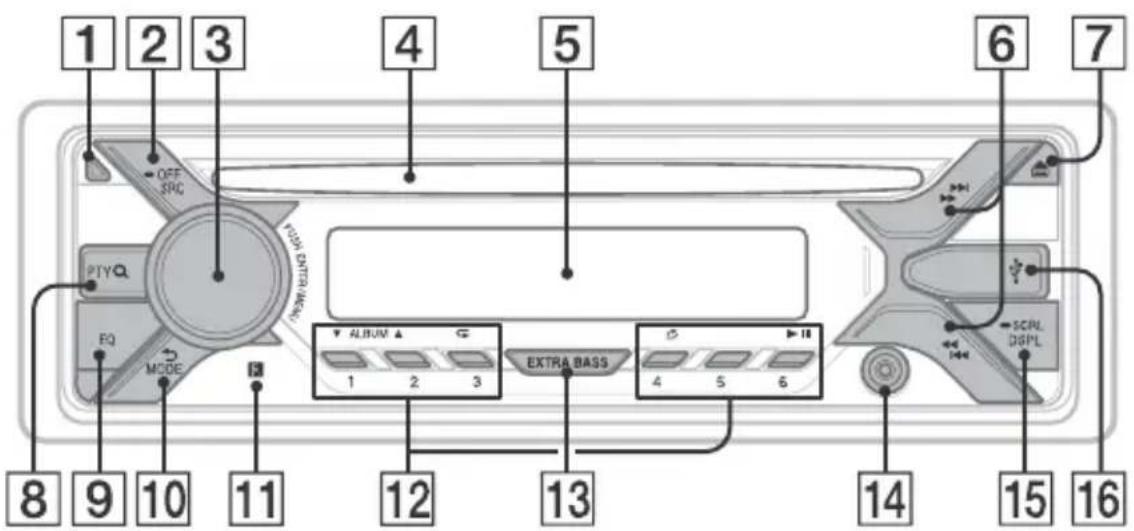
1 Front panel release button
2 SRC (source)
Turn on the power.
Change the source.
OFF
Press and hold for 1 second to turn the source off and display the clock.
Press and hold for more than 2 seconds to turn off the power and the display.
3 Control dial
Rotate to adjust the volume.
PUSH ENTER
Enter the selected item.
MENU
Open the setup menu.
4 Disc slot
5 Display window
6 S E E K - / + )
Tune in radio stations automatically.
Press and hold to tune manually.
I/prev/next)
/ (fast-reverse/fast-forward)
7 (disc eject)
8 PTY (program type)
Select PTY in RDS.
Q (browse) (page 9)
Enter the browse mode during playback. (Not available when a USB device in Android™ mode or iPod is connected.)
EQ (equalizer)
Select an equalizer curve.
back)
Return to the previous display.
MODE (page 7)
11 Receptor for the remote commander
12 Number buttons (1 to 6)
Receive stored radio stations. Press and hold to store stations.
ALBUM /
Skip an album for audio device. Press and hold to skip albums continuously.
Not available when a USB device in
Android mode or iPod is connected.)
(repeat)
Not available when a USB device in
Android mode is connected.
(shuffle)
Not available when a USB device in
Android mode is connected.
II (play/pause)
13 EXTRA BASS
Reinforces bass sound in synchronization with the volume level. Press to change the EXTRA BASS setting: [1], [2], [OFF].
14 AUX input jack
15 DSPL(display)
Change display items.
SCRL (scroll)
Press and hold to scroll a display item.
16 USB port
Getting Started
Detaching the Front Panel
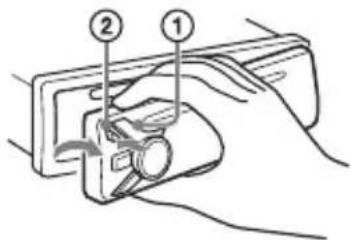
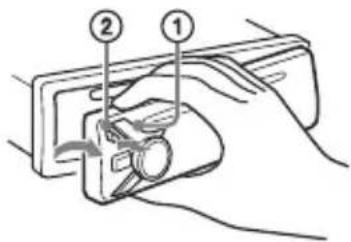
You can detach the front panel of this unit to prevent theft.
1 Press and hold OFF ① until the unit turns off, press the front panel release button ②, then pull the panel towards you to remove.
Caution alarm
If you turn the ignition switch to the OFF position without detaching the front panel, the caution alarm will sound for a few seconds. The alarm will only sound if the built-in amplifier is used.
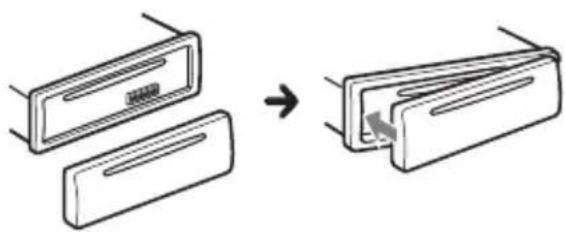
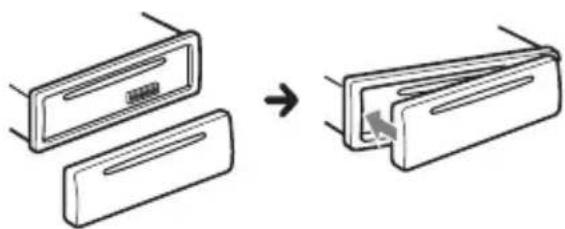
Attaching the front panel
Resetting the Unit
Before operating the unit for the first time, or after replacing the car battery or changing connections, you must reset the unit.
1 Press DSPL and (back)/MODE for more than 2 seconds.
Note
Resetting the unit will erase the clock setting and some stored contents.
Setting the area/region
After resetting the unit, the area/region setting display appears.
1 Press ENTER while [SET AREA] is displayed.
The area/region currently set appears.
2 Rotate the control dial to select [EUROPE] or [RUSSIA], then press it.
3 Rotate the control dial to select [YES] or [NO], then press it. If the setting area/region is changed, the unit is reset, then the clock is displayed.
This setting can be configured in the general setup menu (page 10).
Setting the Clock
1 Press MENU, rotate the control dial to select [GENERAL], then press it.
2 Rotate the control dial to select [SET CLOCK-ADJ], then press it. The hour indication flashes.
3 Rotate the control dial to set the hour and minute. To move the digital indication, press SEEK + / -
4 After setting the minute, press MENU. The setup is complete and the clock starts.
To display the clock Press DSPL.
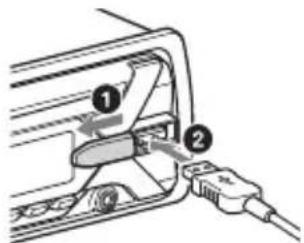
Connecting a USB Device
1 Turn down the volume on the unit.
2 Connect the USB device to the unit. To connect an iPod/iPhone, use the USB connection cable for iPod (not supplied).
Connecting Other Portable Audio Device
1 Turn off the portable audio device.
2 Turn down the volume on the unit.
3 Connect the portable audio device to the AUX input jack (stereo mini jack) on the unit with a connecting cord (not supplied)*.
- Be sure to use a straight type plug.
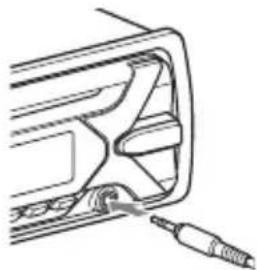
4 Press SRC to select [AUX].
To match the volume level of the connected device to other sources
Start playback of the portable audio device at a moderate volume, and set your usual listening volume on the unit.
Press MENU, then select [SOUND] SET AUX VOL.
Listening to the Radio
Listening to the Radio
To listen to the radio, press SRC to select [TUNER].
Storing automatically (BTM)
1 Press MODE to change the band (FM1, FM2, FM3, MW or LW).
2 Press MENU, rotate the control dial to select [GENERAL], then press it.
3 Rotate the control dial to select [SET BTM], then press it.
The unit stores stations in order of frequency on the number buttons.
Tuning
1 Press MODE to change the band (FM1, FM2, FM3, MW or LW).
2 Perform tuning.
To tune manually
Press and hold SEEK + / - to locate the approximate frequency, then press SEEK + / - repeatedly to fine adjust to the desired frequency.
To tune automatically
Press SEEK + / -
Scanning stops when the unit receives a station.
Storing manually
1 While receiving the station that you want to store, press and hold a number button (1 to 6) until [MEM] appears.
Receiving the stored stations
1 Select the band, then press a number button (1 to 6).
Using Radio Data System (RDS)
Setting alternative frequencies (AF) and traffic announcement (TA)
AF continuously retunes the station to the strongest signal in a network, and TA provides current traffic information or traffic programs (TP) if received.
1 Press MENU, rotate the control dial to select [GENERAL], then press it.
2 Rotate the control dial to select [SET AF/TA], then press it.
3 Rotate the control dial to select [SET AF-ON], [SET TA-ON], [SET AF/TA-ON] or [SET AF/TA-OFF], then press it.
To store RDS stations with the AF and TA setting
You can preset RDS stations along with an AF/TA setting. Set AF/TA, then store the station with BTM or manually. If you preset manually, you can also preset non-RDS stations.
To receive emergency announcements
With AF or TA on, emergency announcements will automatically interrupt the currently selected source.
To adjust the volume level during a traffic announcement
Level will be stored into memory for subsequent traffic announcements, independently from the regular volume level.
To stay with one regional program (REGIONAL)
When the AF and REGIONAL functions are on, you will not be switched to another regional station with a stronger frequency. If you leave this regional program's reception area, set [SET REG-OFF] in [GENERAL] during FM reception (page 11).
This function does not work in the UK and some other areas.
Local Link function (UK only)
This function enables you to select other local stations in the area, even if they are not stored on your number buttons. During FM reception, press a number button (1 to 6) on which a local station is stored. Within 5 seconds, press again a number button of the local station. Repeat this procedure until the local station is received.
Selecting program types (PTY)
1 Press PTY during FM reception.
2 Rotate the control dial until the desired program type appears, then press it. The unit starts to search for a station broadcasting the selected program type.
Type of programs
NEWS (News), AFFAIRS (Current Affairs), INFO (Information), SPORT (Sports), EDUCATE (Education), DRAMA (Drama), CULTURE (Culture), SCIENCE (Science), VARIORED (Varied), POP M (Pop Music), ROCK M (Rock Music), EASY M (M.O.R. Music), LIGHT M (Light classical), CLASSICS (Serious classical), OTHER M (Other Music), WEATHER (Weather), FINANCE (Finance), CHILDREN (Children's program), SOCIAL A (Social Affairs), RELIGION (Religion), PHONE IN (Phone In), TRAVEL (Travel), LEISURE (Leisure), JAZZ (Jazz Music), COUNTRY (Country Music), NATION M (National Music), OLDIES (Oldies Music), FOLK M (Folk Music), DOCUMENT (Documentary)
Setting clock time (CT)
The CT data from the RDS transmission sets the clock.
1 Set [SET CT-ON] in [GENERAL] (page 11).
Playback
Playing a Disc
1 Insert the disc (label side up).
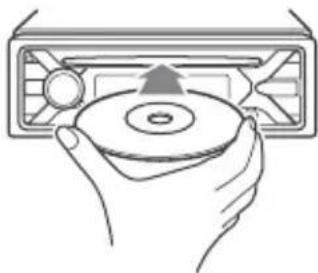
Playback starts automatically.
Playing a USB Device
In these Operating Instructions, "iPod" is used as a general reference for the iPod functions on an iPod and iPhone, unless otherwise specified by the text or illustrations.
For details on the compatibility of your iPod, see "About iPod" (page 14) or visit the support site on the back cover.
AOA (Android Open Accessory) 2.0, MSC (Mass Storage Class) and MTP (Media Transfer Protocol) type USB devices* compliant with the USB standard can be used. Depending on the USB device, the Android mode or MSC/MTP mode can be selected on the unit.
Some digital media players or Android smartphones may require setting to MTP mode.
- e.g., a USB flash drive, digital media player, Android smartphone
Notes
- For details on the compatibility of your USB device, visit the support site on the back cover.
-
Smartphones with Android OS 4.1 or higher installed support Android Open Accessory 2.0 (AOA 2.0). However, some smartphones may not fully support AOA 2.0 even if Android OS 4.1 or higher is installed. For details on the compatibility of your Android smartphone, visit the support site on the back cover.
-
Playback of the following files is not supported. MP3/WMA/FLAC:
-copyright-protected files
- DRM (Digital Rights Management) files
- Multi-channel audio files
MP3/WMA:
- lossless compression files
Before making a connection, select the USB mode (Android mode or MSC/MTP mode) depending on the USB device (page 11).
1 Connect a USB device to the USB port (page 6).
Playback starts.
If a device is already connected, to start playback, press SRC to select [USB] ([IPD] appears in the display when the iPod is recognized).
2 Adjust the volume on this unit.
To stop playback
Press and hold OFF for 1 second.
To remove the device
Stop playback, then remove the device.
Caution for iPhone
When you connect an iPhone via USB, phone call volume is controlled by the iPhone, not the unit. Do not inadvertently increase the volume on the unit during a call, as a sudden loud sound may result when the call ends.
Searching and Playing Tracks
Repeat play and shuffle play
Not available when a USB device in Android mode is connected.
1 During playback, press (repeat) or (shuffle) repeatedly to select the desired play mode.
Playback in the selected play mode may take time to start.
Available play modes differ depending on the selected sound source.
Searching a track by name (QuickBrowZerTM)
Not available when a USB device in Android mode or iPod is connected.
1 During CD or USB playback, press (browse) to display the list of search categories.
When the track list appears, press (back) repeatedly to display the desired search category.
- During USB playback, press (browse) for more than 2 seconds to directly return to the beginning of the category list.
2 Rotate the control dial to select the desired search category, then press it to confirm.
3 Repeat step 2 to search the desired track.
Playback starts.
To exit the Quick-BrowZer mode
Press Q (browse).
Searching by skipping items (Jump mode)
Not available when a USB device in Android mode or iPod is connected.
1Press Q (browse).
2 Press SEEK+.
3 Rotate the control dial to select the item.
The list is jumped in steps of 10% of the total number of items.
4 Press ENTER to return to the QuickBrowZer mode.
The selected item appears.
5 Rotate the control dial to select the desired item, then press it.
Playback starts.
Settings
Canceling the DEMO Mode
You can cancel the demonstration display which appears when the source is off and the clock is displayed.
1 Press MENU, rotate the control dial to select [GENERAL], then press it.
2 Rotate the control dial to select [SET DEMO], then press it.
3 Rotate the control dial to select [SET DEMO-OFF], then press it. The setting is complete.
4 Press (back) twice.
The display returns to normal reception/ play mode.
Basic Setting Operation
You can set items in the following setup categories:
General setup (GENERAL), Sound setup (SOUND), Display setup (DISPLAY)
1 Press MENU.
2 Rotate the control dial to select the setup category, then press it. The items that can be set differ depending on the source and settings.
3 Rotate the control dial to select the options, then press it.
To return to the previous display
Press (back).
General Setup (GENERAL)
AREA
Specifies the area/region to use this unit: [EUROPE], [RUSSIA].
If the area/region currently set is changed, this unit is reset, then the clock is displayed.
(Available only while the source is off and the clock is displayed.)
DEMO (demonstration)
Activates the demonstration: [ON], [OFF].
CLOCK-ADJ (clock adjust) (page 6)
CAUT ALM (caution alarm)
Activates the caution alarm: [ON], [OFF] (page 5).
(Available only while the source is off and the clock is displayed.)
BEEP
Activates the beep sound: [ON], [OFF].
AUTO OFF
Shuts off automatically after a desired time when the unit is turned off: [ON] (30 minutes), [OFF].
STEERING
Registers/resets the setting of the steering wheel remote control.
(Available when connected with the connection cable (not supplied).)
(Available only while the source is off and the clock is displayed.)
STR CONTROL (steering control)
Selects the input mode of the connected remote control. To prevent a malfunction, be sure to match the input mode with the connected remote control before use.
CUSTOM
Input mode for the steering wheel remote control
PRESET
Input mode for the wired remote control excluding the steering wheel remote control (automatically selected when [RESET CUSTOM] is performed.)
EDIT CUSTOM
Registers the functions (SOURCE, ATT, VOL + / - ,SEEK + / - ) to the steering wheel remote control:
1 Rotate the control dial to select the function you want to assign to the steering wheel remote control, then press it.
2 While [REGISTER] is blinking, press and hold the button on the steering wheel remote control you want to assign the function to. When registration is complete, [REGISTERED] is displayed.
To register other functions, repeat steps 1 and 2.
(Available only when [STR CONTROL] is set to [CUSTOM].)
RESET CUSTOM
Resetsthe setting of the steering wheel remote control:[YES],[NO].
(Available only when [STR CONTROL] is set to [CUSTOM].)
Notes
- While making settings, only button operation on the unit is available. For safety, park your car before making this setting.
- If an error occurs while registering, all the previously-registered information remains. Restart registration from the function where the error occurred.
- This function may not be available on some vehicles. For details on the compatibility of your vehicle, visit the support site on the back cover.
USB MODE
Changes the USB mode: [ANDROID], [MSC/MTP].
(Available only when the USB source is selected.)
CT (clock time)
Activates the CT function: [ON], [OFF].
AF/TA (alternative frequencies/traffic announcement)
Selects the alternative frequencies (AF) and traffic announcement (TA) setting: [AF-ON], [TA-ON], [AF/TA-ON], [AF/TA-OFF].
REGIONAL
Restricts reception to a specific region: [ON], [OFF].
(Available only when FM is received.)
BTM (best tuning memory) (page 7)
(Available only when the tuner is selected.)
FIRMAWARE
(Available only while the source is off and the clock is displayed.)
Checks/updates the firmware version. For details, visit the support site on the back cover.
FW VERSION (firmware version)
Displays current firmware version.
FW UPDATE (firmware update)
Enters firmware update process: [YES], [NO].
Updating the firmware takes a few minutes to complete. During the update, do not turn the ignition to the OFF position, nor remove the USB device.
Sound Setup (SOUND)
EQ10 PRESET
Selects an equalizer curve from 10 equalizer curves or off:
[OFF], [R&B], [ROCK], [POP], [HIP-HOP], [ELECTRONICA], [JAZZ], [SOUL],
[COUNTRY], [KARAOKE]*, [CUSTOM].
The equalizer curve setting can be memorized for each source.
- [KARAOKE] reduces the vocal sound but cannot be fully removed during playback. Also, using a microphone is not supported.
EQ10 CUSTOM
Sets [CUSTOM] of EQ10.
Setting the equalizer curve: [BAND1] 32 Hz, [BAND2] 63 Hz, [BAND3] 125 Hz,
[BAND4] 250 Hz, [BAND5] 500 Hz,
[BAND6] 1 kHz, [BAND7] 2 kHz, [BAND8] 4
kHz, [BAND9] 8 kHz, [BAND10] 16 kHz.
The volume level is adjustable in 1 dB steps, from -6 dB to +6 dB.
BALANCE
Adjusts the sound balance: [RIGHT-15] - [CENTER] - [LEFT-15].
FADER
Adjusts the relative level: [FRONT-15] - [CENTER] - [REAR-15].
([ATT] is displayed at the lowest setting.)
Selects the subwoofer phase: [NORM], [REV].
LPF FREQ (low pass filter frequency)
Selects the subwoofer cut-off frequency:
[80Hz], [100Hz], [120Hz].
HPF FREQ (high pass filter frequency)
Selects the front/rear speaker cut-off frequency: [OFF], [80Hz], [100Hz], [120Hz]
AUX VOL (AUX volume level)
Adjusts the volume level for each
connected auxiliary device: [+18dB]
[0 dB] - [-8 dB].
This setting negates the need to adjust
the volume level between sources.
(Available only when the AUX is selected.)
Display Setup (DISPLAY)
DIMMER
Changes the display brightness: [ON], [OFF], [CLK].
To set this function to be active only during a fixed period, select [CLK], then set the start and end times.
- To set the brightness when the dimmer function is activated:
Set [DIMMER] to [ON], then adjust [BRIGHTNESS].
- To set the brightness when the dimmer function is deactivated:
Set [DIMMER] to [OFF], then adjust [BRIGHTNESS].
The brightness setting is stored and applied when the dimmer function is activated or deactivated.
BRIGHTNESS
Adjusts the display brightness. The brightness level is adjustable: [1] - [10].
BUTTON-C (button color)
Sets a preset color or customized color for the buttons.
COLOR
Selects from 15 preset colors, 1
customized color.
CUSTOM-C (custom color)
Registers a customized color for the buttons.
RGB RED, RGB GRN, RGB BLUE
Adjustable color range: [0] - [32] ([0]
cannot be set for all color ranges).
DSPL-C (display color)
Sets a preset color or customized color for the display.
COLOR
Selects from 15 preset colors, 1
customized color.
CUSTOM-C (custom color)
Registers a customized color for the display.
RGB RED, RGB GRN, RGB BLUE
Adjustable color range: [0] - [32] ([0]
cannot be set for all color ranges).
SND SYNC (sound synchronization)
Activates the synchronization of the
illumination with the sound: [ON], [OFF].
AUTO SCR (auto scroll)
Scrolls long items automatically: [ON], [OFF].
(Not available when the AUX or tuner is selected.)
Additional Information
Updating the Firmware
To update the firmware, visit the support site on the back cover, then follow the online instructions.
Notes
- Using a USB device (not supplied) is required for updating the firmware. Store the updater in the USB device, and connect the device to the USB port, then perform the update operation.
- Updating the firmware takes a few minutes to complete. During the update, do not turn the ignition to the OFF position, nor remove the USB device.
Precautions
Cool off the unit beforehand if your car has been parked in direct sunlight.
- Do not leave the front panel or audio devices brought in inside the car, or it may cause malfunction due to high temperature in direct sunlight.
- Power antenna (aerial) extends automatically.
Moisture condensation
Should moisture condensation occur inside the unit, remove the disc and wait for about an hour for it to dry out; otherwise the unit will not operate properly.
To maintain high sound quality
Do not splash liquid onto the unit or discs.
Notes on discs
- Do not expose discs to direct sunlight or heat sources such as hot air ducts, nor leave it in a car parked in direct sunlight.
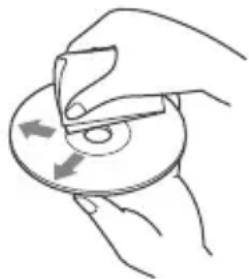
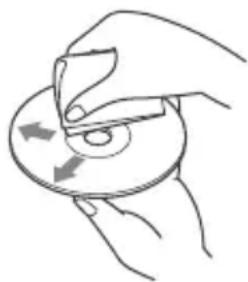
- Before playing, wipe the discs with a cleaning cloth from the center out. Do not use solvents such as benzine, thinner, commercially available cleaners.
- This unit is designed to play discs that conform to the Compact Disc (CD) standard. DualDiscs and some of the music discs encoded with copyright protection technologies do not conform to the Compact Disc (CD) standard, therefore, these discs may not be playable by this unit.
- Discs that this unit CANNOT play
- Discs with labels, stickers, or sticky tape or paper attached. Doing so may cause a malfunction, or may ruin the disc.
- Discs with non-standard shapes (e.g., heart, square, star). Attempting to do so may damage the unit.
- 8 cm (1/4 in) discs.
Notes on CD-R/CD-RW discs
- If the multi-session disc begins with a CD-DA session, it is recognized as a CD-DA disc, and other sessions are not played.
- Discs that this unit CANNOT play
- CD-R/CD-RW of poor recording quality.
- CD-R/CD-RW recorded with an incompatible recording device.
- CD-R/CD-RW which is finalized incorrectly.
- CD-R/CD-RW other than those recorded in music CD format or MP3 format conforming to ISO9660 Level 1/Level 2, Joliet/Romeo or multi-session.
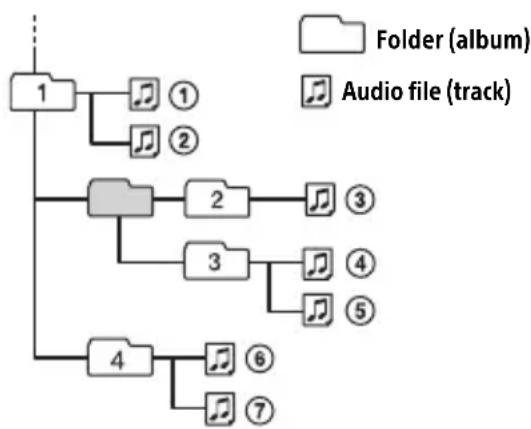
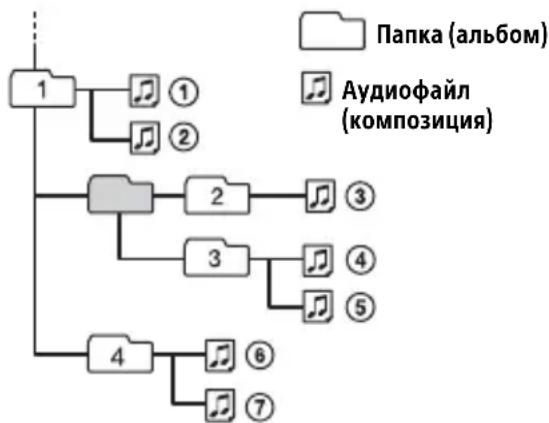
Playback order of audio files
About iPod
- You can connect to the following iPod models. Update your iPod devices to the latest software before use.
Compatible iPhone/iPod models
| Compatible Model USB | |
| iPhone 6s Plus | ✓ |
| iPhone 6s | ✓ |
| iPhone 6 Plus | ✓ |
| iPhone 6 | ✓ |
| iPhone 5s | ✓ |
| iPhone 5c | ✓ |
| iPhone 5 | ✓ |
| iPhone 4s | ✓ |
| iPod touch (6th generation) | ✓ |
| iPod touch (5th generation) | ✓ |
| iPod nano (7th generation) | ✓ |
- "Made for iPod," and "Made for iPhone," mean that an electronic accessory has been designed to connect specifically to iPod or iPhone, respectively, and has been certified by the developer to meet Apple performance standards. Apple is not responsible for the operation of this device or its compliance with safety and regulatory standards. Please note that the use of this accessory with iPod or iPhone may affect wireless performance.
If you have any questions or problems concerning your unit that are not covered in this manual, consult your nearest Sony dealer.
Maintenance
Cleaning the connectors
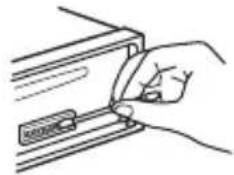
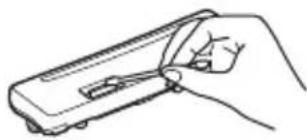
The unit may not function properly if the connectors between the unit and the front panel are not clean. In order to prevent this, detach the front panel (page 5) and clean the connectors with a cotton swab. Do not apply too much force. Otherwise, the connectors may be damaged.
Notes
-
For safety, turn off the ignition before cleaning the connectors, and remove the key from the ignition switch.
-
Never touch the connectors directly with your fingers or with any metal device.
Specifications
Tuner section
FM
Tuning range: When [AREA] is set to [EUROPE]: 87.5 MHz - 108.0 MHz When [AREA] is set to [RUSSIA]: FM1/FM2: 87.5 MHz - 108.0 MHz (at 50 kHz step) FM3: 65 MHz - 74 MHz (at 30 kHz step) Antenna (aerial) terminal: External antenna (aerial) connector Intermediate frequency: When [AREA] is set to [EUROPE]: FM CCIR: -1,956.5 kHz to -487.3 kHz and +500.0 kHz to +2,095.4 kHz When [AREA] is set to [RUSSIA]: FM CCIR: -1,956.5 kHz to -487.3 kHz and +500.0 kHz to +2,095.4 kHz FM OIRT: -1,815.6 kHz to -943.7 kHz and +996.6 kHz to +1,776.6 kHz Usable sensitivity: 7 dBf Selectivity: 75 dB at 400 kHz Signal-to-noise ratio: 73 dB Separation: 50 dB at 1 kHz Frequency response: 20 Hz - 15,000 Hz MW/LW Tuning range: MW: 531 kHz - 1,602 kHz LW: 153 kHz - 279 kHz Antenna (aerial) terminal: External antenna (aerial) connector Sensitivity: MW: 26 V, LW: 50 V
CD Player section
Signal-to-noise ratio: 95 dB
Frequency response: 10Hz - 20,000Hz Wow and flutter: Below measurable limit
The maximum number of: (CD-R/CD-RW only)
- folders (albums): 150 (including root folder)
- files (tracks) and folders: 300 (may less than 300 if folder/file names contain many characters)
- displayable characters for a folder/file name: 32 (Joliet)/64 (Romeo)
Corresponding codec: MP3 (.mp3) and WMA (.wma)
USB Player section
Interface: USB (Full-speed)
Maximum current: 1 A
The maximum number of recognizable tracks:
- folders (albums): 256
- files (tracks) per folder: 256
Compatible Android Open Accessory protocol (AOA): 2.0
Corresponding codec: MP3 (.mp3)
Bit rate: 8 kbps - 320 kbps (Supports VBR (Variable Bit Rate))
Sampling rate: 16 kHz - 48 kHz
WMA (.wma)
Bit rate: 32 kbps - 192 kbps (Supports VBR (Variable Bit Rate))
Sampling rate: 32 kHz, 44.1 kHz, 48 kHz
FLAC (.flac)
Bit depth: 16 bit, 24 bit
Sampling rate: 44.1 kHz, 48 kHz
Power amplifier section
Output: Speaker outputs
Speaker impedance: 4 - 8 Maximum power output: 55W × 4 (at 4 )
General
Outputs: Audio outputs terminal (REAR, SUB) Power antenna (aerial)/Power amplifier control terminal (REM OUT)
Inputs:
Remote controller input terminal
Antenna (aerial) input terminal
Power requirements: 12 V DC car battery (negative ground (earth))
Rated current consumption: 10 A
Dimensions:
Approx. 178mm× 50mm× 177mm
(7 1/8 in × 2 in × 7 in) (w/h/d)
Mounting dimensions:
Approx. 182mm× 53mm× 160mm
(7 1/4 in × 2 1/8 in × 6 5/16 in) (w/h/d)
Mass: Approx. 1.2kg (2 lb 11 oz)
Package contents:
Main unit (1)
Parts for installation and connections (1 set)
Your dealer may not handle some of the above listed accessories. Please ask the dealer for detailed information.
Design and specifications are subject to change without notice.
Copyrights
Windows Media is either a registered trademark or trademark of Microsoft Corporation in the United States and/or other countries.
This product is protected by certain intellectual property rights of Microsoft Corporation. Use or distribution of such technology outside of this product is prohibited without a license from Microsoft or an authorized Microsoft subsidiary.
iPhone, iPod, iPod classic, iPod nano, and iPod touch are trademarks of Apple Inc., registered in the U.S. and other countries.
MPEG Layer-3 audio coding technology and patents licensed from Fraunhofer IIS and Thomson.
Android is a trademark of Google Inc.
libFLAC
Copyright (C) 2000-2009 Josh Coalson
Copyright (C) 2011-2013 Xiph.Org Foundation
Redistribution and use in source and binary forms, with or without modification, are permitted provided that the following conditions are met:
- Redistributions of source code must retain the above copyright notice, this list of conditions and the following disclaimer.
- Redistributions in binary form must reproduce the above copyright notice, this list of conditions and the following disclaimer in the documentation and/or other materials provided with the distribution.
- Neither the name of the Xiph.org Foundation nor the names of its contributors may be used to endorse or promote products derived from this software without specific prior written permission.
THIS SOFTWARE IS PROVIDED BY THE
COPYRIGHT HOLDERS AND CONTRIBUTORS "AS IS" AND ANY EXPRESS OR IMPLIED
WARRANTIES, INCLUDING, BUT NOT LIMITED TO, THE IMPLIED WARRANTYES OF
MERCHANTABILITY AND FITNESS FOR A
PARTICULAR PURPOSE ARE DISCLAIMED. IN NO EVENT SHALL THE FOUNDATION OR
CONTRIBUTORS BE LIABLE FOR ANY DIRECT,
INDIRECT, INCIDENTAL, SPECIAL,
EXEMPLARY, OR CONSEQUENTIAL DAMAGES (INCLUDING, BUT NOT LIMITED TO,
PROCUREMENT OF SUBSTITUTE GOODS OR SERVICES; LOSS OF USE, DATA, OR PROFITS; OR BUSINESS INTERRUPTION) HOWEVER CAUSED AND ON ANY THEORY OF LIABILITY,
WHETHER IN CONTRACT, STRICT LIABILITY,
OR TORT (INCLUDING NEGLIGENCE OR
OTHERWISE) ASING IN ANY WAY OUT OF THE USE OF THIS SOFTWARE, EVEN IF
ADVISED OF THE POSSIBILITY OF SUCH DAMAGE.
Troubleshooting
The following checklist will help you remedy problems you may encounter with your unit. Before going through the checklist below, check the connection and operating procedures.
For details on using the fuse and removing the unit from the dashboard, see "Connection/Installation" (page 21). If the problem is not solved, visit the support site on the back cover.
General
No sound or the sound is very low.
The position of the fader control [FADER] is not set for a 2-speaker system.
The volume of the unit and/or connected device is very low.
- Increase the volume of the unit and connected device.
No beep sound.
An optional power amplifier is connected and you are not using the built-in amplifier.
The contents of the memory have been erased.
The power supply lead or battery has been disconnected or not connected properly.
Stored stations and correct time are erased.
The fuse has blown.
Makes a noise when the position of the ignition is switched.
The leads are not matched correctly with the car's accessory power connector.
During playback or reception, the demonstration mode starts.
If no operation is performed for 5 minutes with [DEMO-ON] set, the demonstration mode starts.
- Set [DEMO-OFF] (page 10).
The display disappears from/does not appear in the display window.
The dimmer is set to [DIM-ON] (page 12).
The display disappears if you press and hold OFF.
- Press OFF on the unit until the display appears.
The connectors are dirty (page 14).
The display/illumination flashes.
The power supply is not sufficient.
- Check that the car battery supplies enough power to the unit. (The power requirement is 12VDC .)
The operation buttons do not function. The disc will not eject.
Press DSPL and (back)/MODE for more than 2 seconds to reset the unit.
The contents stored in memory are erased.
For your safety, do not reset the unit while you are driving.
Radio reception
Stations cannot be received.
The sound is hampered by noises.
The connection is not correct.
- Check the connection of the car antenna (aerial).
- If the auto antenna (aerial) will not extend, check the connection of the power antenna (aerial) control lead.
Preset tuning is not possible.
The broadcast signal is too weak.
65 MHz to 74 MHz in FM3 cannot be tuned in.
[AREA] is set to [EUROPE].
- Set [AREA] to [RUSSIA] (page 10).
RDS
RDS services cannot be received (when [AREA] is set to [RUSSIA]).
FM3 is selected.
- Select FM1 or FM2.
RDS services are unavailable in the current region.
The SEEK starts after a few seconds of listening.
The station is non-TP or has weak signal. -Deactivate TA (page 7).
No traffic announcements.
Activate TA (page 7).
The station does not broadcast any traffic announcements despite being TP. -Tune in another station.
PTY displays [- - - - - - - - ].
The current station is not an RDS station.
RDS data has not been received.
The station does not specify the program type.
Program service name flashes.
There is no alternative frequency for the current station.
- Press SEEK +/- while the program service name is flashing. [PI SEEK] appears and the unit starts searching for another frequency with the same PI (program identification) data.
CD playback
The disc does not play.
Defective or dirty disc.
The CD-R/CD-RW is not for audio use (page 13).
MP3/WMA files cannot be played.
The disc is incompatible with the MP3/WMA format and version. For details on playable discs and formats, visit the support site on the back cover.
MP3/WMA files take longer to play than others.
The following discs take a longer time to start playback.
- A disc recorded with a complicated tree structure.
- A disc recorded in Multi Session.
- A disc to which data can be added.
The sound skips.
Defective or dirty disc.
USB device playback
You cannot play items via a USB hub.
This unit cannot recognize USB devices via a USB hub.
A USB device takes longer to play.
The USB device contains files with a complicated tree structure.
The sound is intermittent.
The sound may be intermittent at a high-bit-rate.
DRM (Digital Rights Management) files may not be playable in some cases.
Audio file cannot be played.
USB device formatted with file systems other than FAT16 or FAT32 are unsupported.*
* This unit supports FAT16 and FAT32, but some USB device may not support all of these FAT. For details, refer to the operating instruction of each USB device or contact the manufacturer.
Operations for skipping an album, skipping items (Jump mode), and searching a track by name (QuickBrowZer) cannot be performed.
These operations cannot be performed when a USB device in Android mode or iPod is connected.
- Set [USB MODE] to [MSC/MTP] (page 11).
- Remove the iPod.
The USB mode of the device is not set to the appropriate mode.
- Make sure that the USB mode of the device is set to MSC/MTP mode.
The sound cannot be output during playback in Android mode.
While the unit is in Android mode, the sound outputs only from the Android smartphone.
- Check the status of the audio playback application on the Android smartphone.
- Playback may not perform properly depending on the Android smartphone.
Messages
The following messages may appear or flash during operation.
CD ERROR: The disc cannot be played. The disc will be ejected automatically.
Clean or insert the disc correctly, or make sure the disc is not blank or defective.
CD NO MUSIC: There is no playable file. The disc will be ejected automatically.
Insert a disc containing playable files (page 15).
CD PUSH EJT: The disc could not be ejected properly.
Press (eject).
HUB NO SUPRT: USB hubs are not supported.
INVALID
The selected operation could be invalid.
[USB MODE] cannot be changed during iPod playback.
IPD STOP: iPod playback has finished.
Operateryour iPod/iPhone to start playback.
NO AF: No alternative frequencies.
Press SEEK + / - while the program service name is flashing. The unit starts searching for another frequency with the same PI (program identification) data ([PI SEEK] appears).
NO TP: No traffic programs.
The unit will continue searching for available TP stations.
NOT SUPPORT -Android MODE
A USB device not supporting AOA (Android Open Accessory) 2.0 is connected to the unit while [USB MODE] is set to [ANDROID]. - Set [USB MODE] to [MSC/MTP] (page 11).
OVERLOAD: The USB device is overloaded.
Disconnect the USB device, then press SRC to select another source.
The USB device has a fault, or an unsupported device is connected.
READ: Now reading information.
Wait until reading is complete and playback starts automatically. This may take some time depending on the file organization.
USB ERROR: The USB device cannot be played.
Connect the USB device again.
USB NO DEV: A USB device is not connected or recognized.
Make sure the USB device or USB cable is securely connected.
USB NO MUSIC: There is no playable file.
Connect a USB device containing playable files (page 15).
USB NO SUPRT: The USB device is not supported.
For details on the compatibility of your USB device, visit the support site on the back cover.
LLL or The beginning or the end of the disc has been reached.
- (underscore): The character cannot be displayed.
For steering wheel remote control operation:
ERROR: An error occurred during the function registration.
Register again from the function where the error occurred (page 11).
TIMEOUT: The function registration failed due to a timeout.
Try completing the registration while [REGISTER] is blinking (about 6 seconds) (page 11).
If these solutions do not help improve the situation, consult your nearest Sony dealer. If you take the unit to be repaired because of CD playback trouble, bring the disc that was used at the time the problem began.
Connection/Installation
Cautions
- Run all ground (earth) leads to a common ground (earth) point.
- Do not get the leads trapped under a screw, or caught in moving parts (e.g., seat railing).
- Before making connections, turn the car ignition off to avoid short circuits.
- Connect the power supply lead ⑥ to the unit and speakers before connecting it to the auxiliary power connector.
- Be sure to insulate any loose unconnected leads with electrical tape for safety.
Precautions
- Choose the installation location carefully so that the unit will not interfere with normal driving operations.
- Avoid installing the unit in areas subject to dust, dirt, excessive vibration, or high temperature, such as in direct sunlight or near heater ducts.
- Use only the supplied mounting hardware for a safe and secure installation.
Note on the power supply lead (yellow)
When connecting this unit in combination with other stereo components, the amperage rating of the car circuit to which the unit is connected must be higher than the sum of each component's fuse amperage rating.
Mounting angle adjustment
Adjust the mounting angle to less than 45^ .
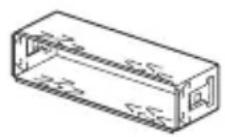
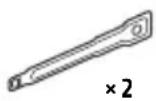
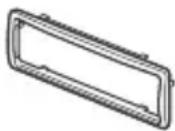
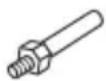
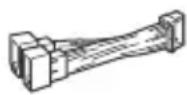
Parts List for Installation
①
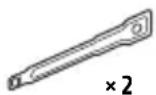
(2)
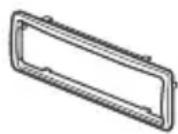
(3)
(4)
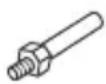

(5)
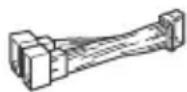
(6)
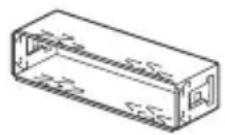
- This parts list does not include all the package contents.
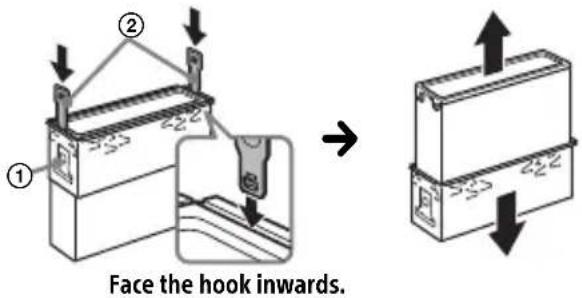
- The bracket ① and the protection collar ③ are attached to the unit before shipping. Before mounting the unit, use the release keys ② to remove the bracket ① from the unit. For details, see "Removing the protection collar and the bracket" (page 24).
- Keep the release keys ② for future use as they are also necessary if you remove the unit from your car.
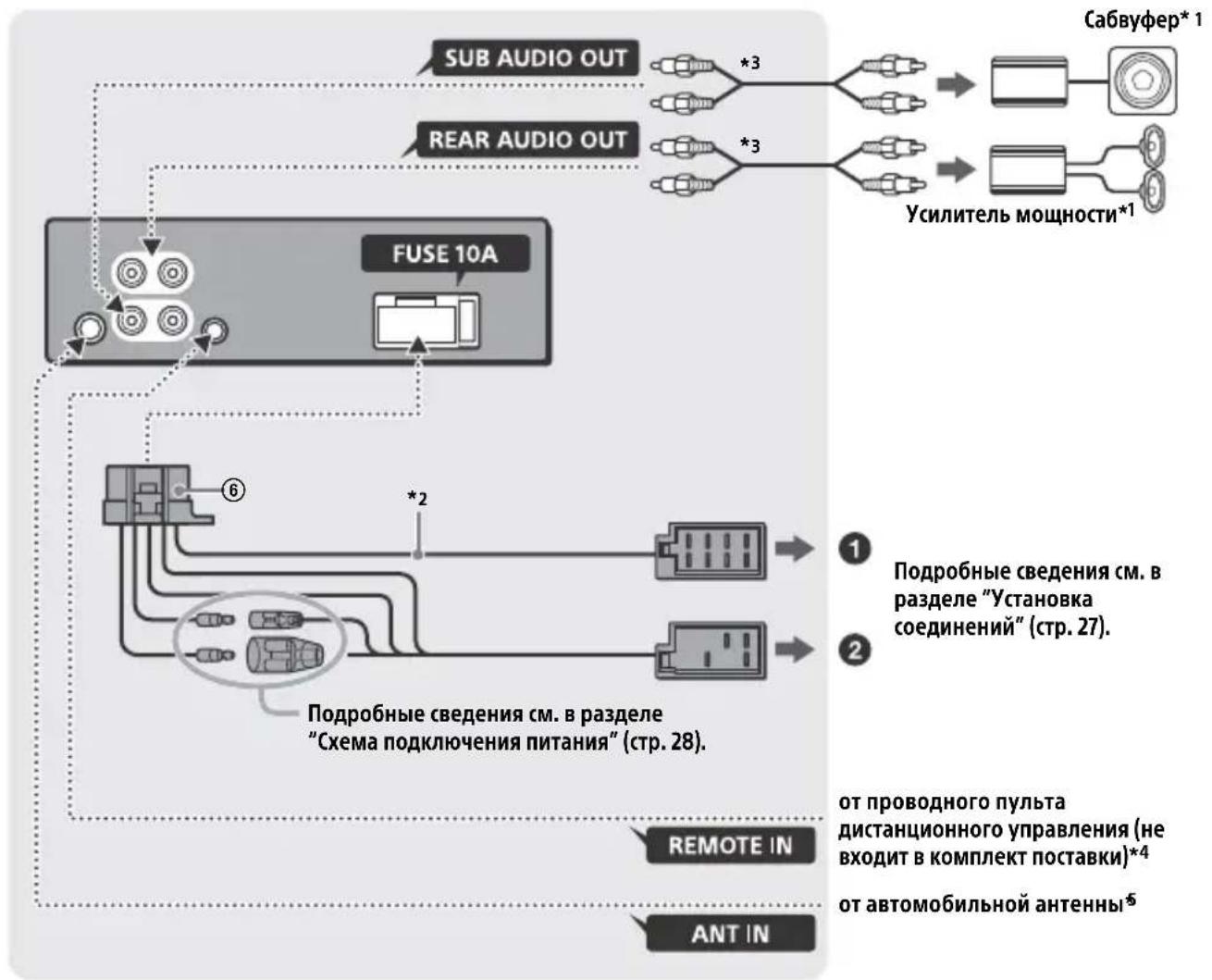
Connection
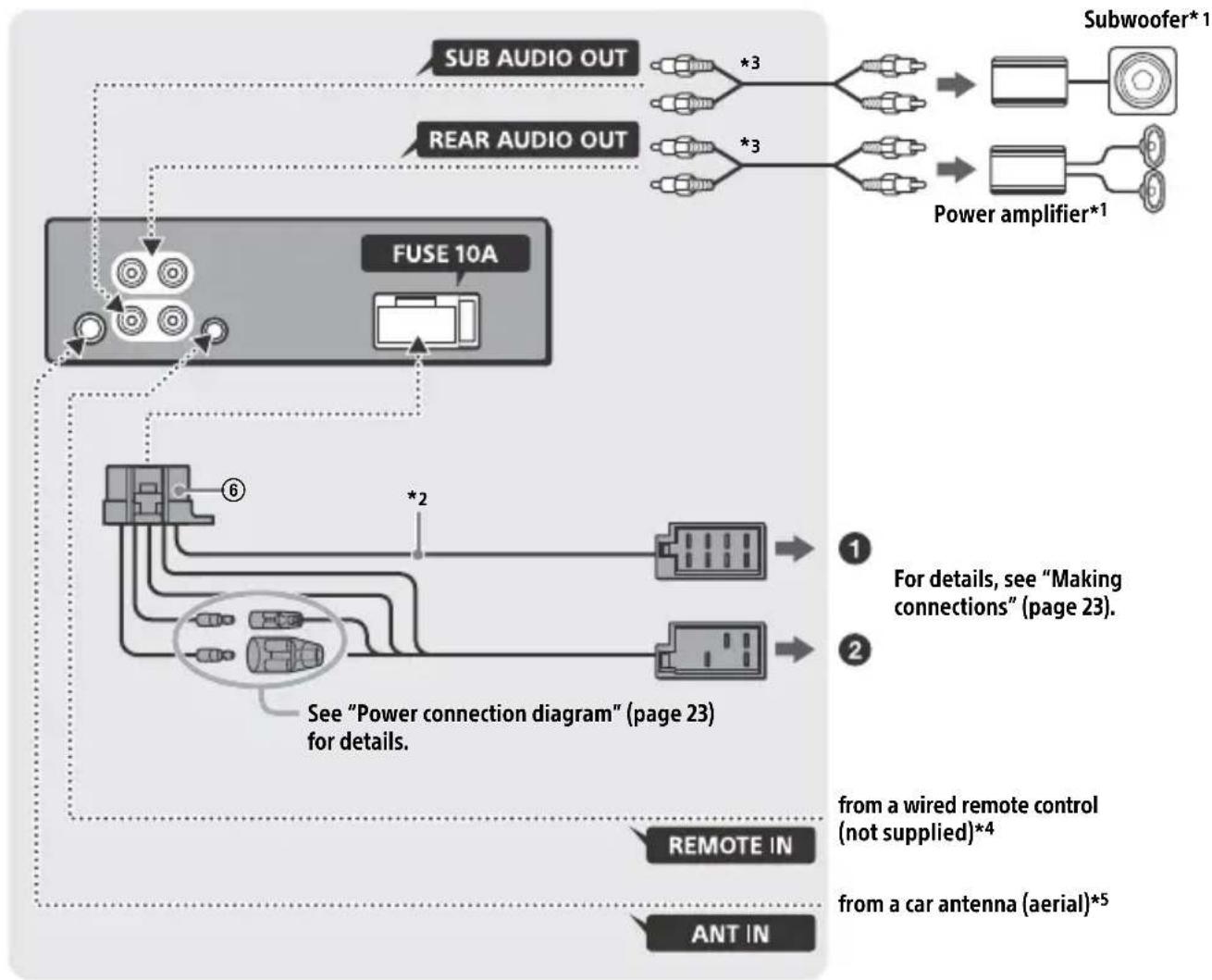
1 Not supplied
2 Speaker impedance: 4 - 8 × 4
3 RCA pin cord (not supplied)
4 Depending on the type of car, use an adaptor for a wired remote control (not supplied). For details on using the wired remote control, see "Using the wired remote control" (page 24).
*5 Depending on the type of car, use an adaptor (not supplied) if the antenna connector does not fit.
Making connections
If you have a power antenna (aerial) without a relay box, connecting this unit with the supplied power supply lead ⑥ may damage the antenna (aerial).
To the car's speaker connector
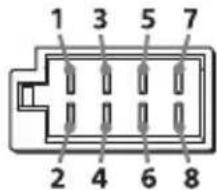
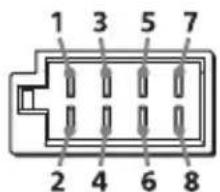
| 1 | Rear speaker (right) | ⊕ | Purple |
| 2 | Purple/black striped | ||
| 3 | Front speaker (right) | ⊕ | Gray |
| 4 | Gray/black striped | ||
| 5 | Front speaker (left) | ⊕ | White |
| 6 | White/black striped | ||
| 7 | Rear speaker (left) | ⊕ | Green |
| 8 | Green/black striped |
To the car's power connector
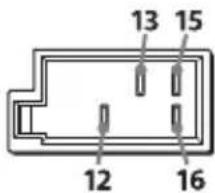
| 12 | continuous power supply | Yellow |
| 13 | power antenna (aerial) /power amplifier control (REM OUT) | Blue/white striped |
| 15 | switched power supply | Red |
| 16 | ground (earth) Black |
Subwoofer Easy Connection
You can use a subwoofer without a power amplifier when it is connected to a rear speaker cord.
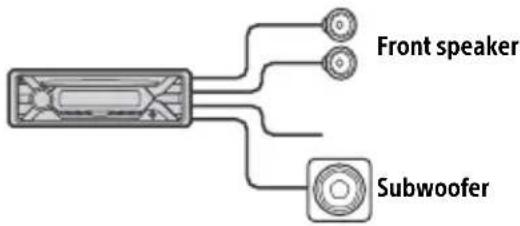
Notes
- Preparation of the rear speaker cords is required.
- Use a subwoofer with an impedance of 4 to 8 , and with adequate power handling capacities to avoid damage.
Memory hold connection
When the yellow power supply lead is connected, power will always be supplied to the memory circuit even when the ignition switch is turned off.
Speaker connection
Before connecting the speakers, turn the unit off.
- Use speakers with an impedance of 4 to 8 , and with adequate power handling capacities to avoid damage.
Power connection diagram
Make sure your car's auxiliary power connector, and match the connections of cords correctly depending on the car.
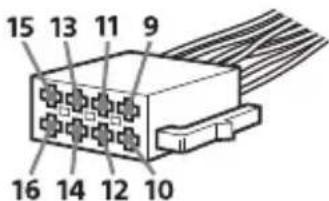
Auxiliary power connector
Common connection
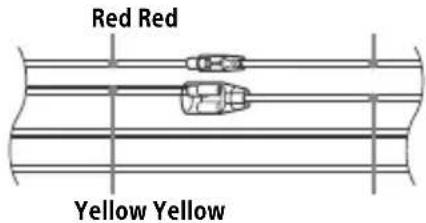
| 12 | continuous power supply | Yellow |
| 15 | switched power supply Red |
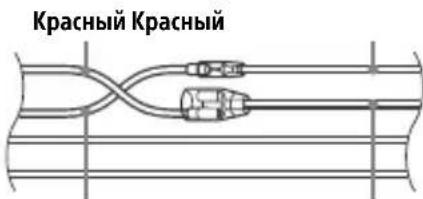
When the positions of the red and yellow leads are inverted
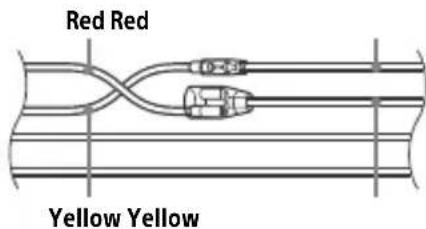
| 12 | switched power supply Yellow | |
| 15 | continuous power supply | Red |
When the car without ACC position
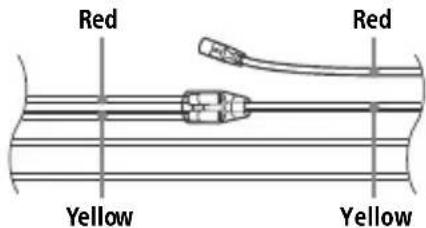
After matching the connections and switching power supply leads correctly, connect the unit to the car's power supply. If you have any questions and problems connecting your unit that are not covered in this manual, consult the car dealer.
Using the wired remote control
1 To enable the wired remote control, set [STR CONTROL] in [SET STEERING] to [PRESET] (page 10).
Installation
Removing the protection collar and the bracket
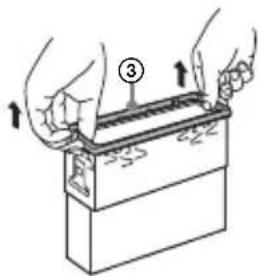
Before installing the unit, remove the protection collar ③ and the bracket ① from the unit.
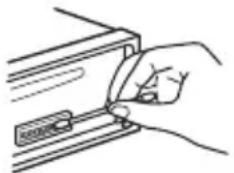
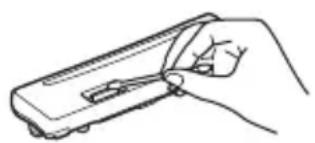
1 Pinch both edges of the protection collar ③ then pull it out.
2 Insert both release keys ② until they click, and pull down the bracket ①, then pull up the unit to separate.
Mounting the unit in the dashboard
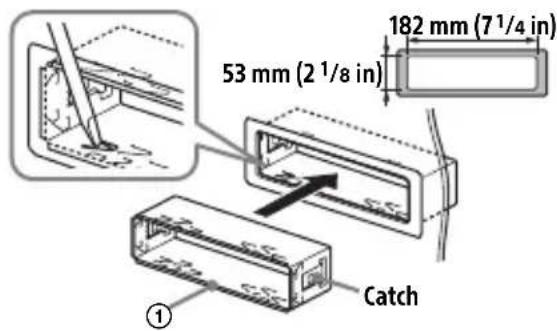
Before installing, make sure the catches on both sides of the bracket ① are bent inwards 2mm (3/32 in).
1 Position the bracket ① inside the dashboard, then bend the claws outward for a tight fit.
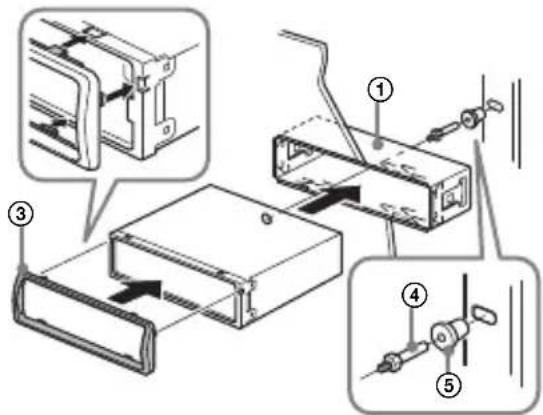
2 Mount the unit onto the bracket ①, then attach the protection collar ③.
Notes
- If the catches are straight or bent outwards, the unit will not be installed securely and may spring out.
Make sure the 4 catches on the protection collar ③ are properly engaged in the slots of the unit.
Detaching and attaching the front panel
For details, see "Detaching the Front Panel" (page 5).
Resetting the unit
For details, see "Resetting the Unit" (page 5).
Fuse replacement
When replacing the fuse, be sure to use one
matching the amperagerating stated on the
is original fuse. If the fuel
blows, check the power connection and replace the
fuse. If the fuse blows again after
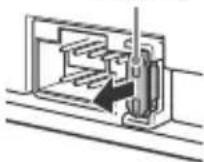
Fuse (10 A)
replacement, there may be an internal malfunction. In such a case, consult your nearest Sony dealer.
FW VERSION (Firmwareversion)
[BAND6] 1 kHz, [BAND7] 2 kHz, [BAND8]
4 kHz, [BAND9] 8 kHz, [BAND10] 16 kHz.
Abstrate: 16 kHz - 48 kHz
WMA (.wma)
Bitrate: 32 Kbps - 192 Kbps (Unterstutz VBR (variable Bitrate))
Abtastrate: 32 kHz, 44,1 kHz, 48 kHz
FLAC (.flac)
Copyright (C) 2000-2009 Josh Coalson
Copyright (C) 2011-2013 Xiph.Org Foundation
Raccordement/Installation
Attention. 25
La lecture commence.
DEMO (demonstration)
Permet d'activer la démonstration : [ON], [OFF].
[BAND6] 1 kHz, [BAND7] 2 kHz, [BAND8]
4 kHz, [BAND9] 8 kHz, [BAND10] 16 kHz.
Protocole AOA (Android Open Accessory) compatible : 2.0
Codec correspondent : MP3 (.mp3)
Débit binaire : 8 kbits/s - 320 kbits/s (prise en charge de VBR (Variable Bit Rate))
Appareil principal (1)
Copyright (C) 2000-2009 Josh Coalson
Copyright (C) 2011-2013 Xiph.Org Foundation
Raccordement/Installation
Attention
Interfaccia: USB (Full speed)
cartelle (album): 256
-file(brani)per cartella:256
Protocollo compatible Android Open Accessory (AOA): 2.0
Codec correspondenti: MP3 (.mp3)
Copyright (C) 2000-2009 Josh Coalson
Copyright (C) 2011-2013 Xiph.Org Foundation
Geproduced in Thailand
Eigenschappen laserdiode
Producent: Sony Corporation, 1-7-1 Konan
Minato-ku Tokyo, 108-0075 Japan
Selecteer PTY in RDS.
250 Hz, [BAND5] 500 Hz, [BAND6] 1 kHz, [BAND7] 2 kHz, [BAND8] 4 kHz, [BAND9]
8 kHz, [BAND10] 16 kHz.
Wanner [AREA] is ingesteld op
[EUROPE]:
87,5 MHz - 108,0 MHz
Wanner [AREA] is ingesteld op [RUSSIA]:
FM1/FM2: 87,5 MHz - 108,0 MHz (in stappen van 50 kHz)
FM3: 65 MHz - 74 MHz (in stappen van 30 kHz)
Antenneaansluiting:
Interface: USB (Full-speed)
Maximale stroom: 1 A
- mappings (albums): 256
bestanden tracks) per map: 256
Geschikt Android Open Accessory Protocol (AOA): 2.0
Bijbehorende codec: MP3 (.mp3)
Bitfrequentie: 8 kbps -320 kbps (Ondersteunt VBR (Variable Bit Rate))
Sampling-frequentie: 16kHz - 48kHz
WMA (.wma)
Bitfrequentie: 32 kbps - 192 kbps (Ondersteunt VBR (Variable Bit Rate))
Sampling-frequentie: 32kHz 44,1 kHz, 48 kHz
FLAC(.flac)
Bitdiepte: 16 bit, 24 bit
Sampling-frequentie: 44,1 kHz - 48 kHz
Eindversterker
Pon3Bovntelb: CoHn KopnpoeuH, 1-7-1
KoHaH MnHaTo-Ky TokNo, 108-0075 JnoHna
B ueJx 6e30nacHocTn o6raTeIbHo yCTaHaBnBaIte 3TO yCTpoIcTBO Ha np6bOpHO nAHeJI nABTomO6nJI, TaK KaKe ero 3aDnJa Yactb HArpeBaETcR BO Bpempa60Tbl.
PnoPpOHee cm. "YcTaHOBka/ PnOKnIOUChEnE" (CTp. 25).
CboiCTBa Ia3epHoro IIOnda
- PpOJXHTeJIbHOCTb n3JIyHeHn: HenpepbIBHoe
- BbIXoHna MoUHocTb Ja3epa: MeHbIe 53,3 MKBT
(3начени полунуении Марпастояни 200mm OT NOВЕРХОCTN ЛИНЗblобъктNBа 6ЛOKA ONTNUECKOTO CHTbIBaHЯс aneptypo7 MM.)
Tabnukc cyka3aHneM pa6oeryo HapjKeHnI npyInx xapaKTePncTnK HaxOHTcHa HnXHei naHelen Kopnyca.
Даразиотовлия указа на.ToBape,a TaKxe Ha ynaKOBke B cIeNyUoIeM φopMaTe:
MM.YYYY, rnde MM - mecau n YYYYY - roi n3rotobleny.
HOpMaunIyNokynateneB YkpanHe

YnoHOMOeHHbI npedCTaBntlb YKpaHHe NO BONpocam COOTBeTCTBn Tpe6oBaHm TexHnuecknx peIJaMeHTOB: OOO "CoHn YKpaHa", yI. NJIbHcKa, 8, r. KneB, 04070, YKpaHa.
ObopydOBaHne OTBeuaeT Tpe6OBAHnM TexHnueckoro perIamEnTa OpranuHcHn IcNoJIb3OBAHn HeKOTOpbIX ONaChbIX BeueCTB 3JIeKTPnueCKOM N 3JIeKTpOnHHom obopydOBaHn (noCTaHOBLeHne KMY ot 03.12.2008 N° 1057).
YcIOBxpaHeHn
TobapbcoxpaHOT ByyNAKOBAHHOM BnDe B TeMHbIX, cyNX, YnCTbIX, XopoO BoHTUNIPyeMbIX NOMEuEHNrX, N3OJInpoBaHHbIX OT MeCt XpaHeHnKNCJOT nIeIoueY.
TemnepaTypa xpaHEny: ot -20 do +60 ^ C OTHOCuTeNbHa BlaXHoCTb XpaHEny: 80%. Pa6oay TempePaTypa: ot 0 do 40°C. Pa6oay OTHOCuTeNbHa BlaXHoCTb: 40-60%.
YTNIN3aunna
NcnoJb3OBaHHbIX
3JeMeHTOB NITAHnI NOTCLyXKBWeRo
3JeKTpNUeCKOrO n
3JIeKTPoHOrO 6OpUdoBaHnA (DInpeKTHBa npImMeHReTcB CtpaHax Ebpocoi03a n Dpynx EBponecknx CtpaHax, rIe JeICTByOT cNCTembl pa3dJIbHOrO c6opa OTXoDoB)
PpeDynpexKdHne dIaClyuaeB, KOrda B 3aMKe 3aXnraHna Het noLoXkeHnA CC
Y6eINTEcB, YTO HaCTpoEHa FyHKUa
AUTO OFF (ctp. 12).IocNe BbIKIOueHnra
yCTPOiCTBa erO nITaHne 6yJeT
aBTOMATnueCKN OTKIOUeHO uepe3
yCTaHOBJIeHHOE BPEM, YTO
IpeDToBpaAaeT pa3PRAky aKKymJIATopa.
EcIn FyHKUa AUTO OFF He 3aJaHa, To
Pn KaXdOM BbIKIOueHn 3axnraHn
HaXmMaTe n yDepxNBaIte KhoNkOFF
Do Tex nop, NOKa DnCnIeH He NoracHeT.
OTka3 OT OTBETCTBEHHOCTN B OTHoWeHn ycIyr, npeDoCTaBJaEmbIX CTOpOHHMn NOCTaBzIKamN
Cnyk6bl, npedocTabIeMbIe CTOpOHHIMNIOCTaBUNKaMn,MOyT 6bITb N3MeHeHbI, pnoctaHOBJIeHbI NN OTMeHeHbI 6e3 npedBaPntbHoro yBeOMJeHn. KompanaHn Sony He Hecet OTBeTCTBeHHOCTn 3a CNTyaun Noo6HOro poJa.
Copepkanhe
CnpaBoUHnK nO deTajm N opraHaM ynpaBJIeHnJ 4
Haualo pa60tbl
ChTne npeDne nnHei 5
Ipee3arpy3ka yctpoiCTBa 6
YCTaHOBka YacOB 6
PoiKJIHueHne yCTpoiCTBa USB 6
IopKluoyeHne npyroro nepehocchoro ayuOuyctpoNCTBa . 7
PpocnyuBauHne paNo
PpocnyuBHaHne paIIO 7
CnCTemblpaIIOaHHbIX(RDS) 8
Bocnpon3BeDeHne
Bocnpoun3BeJeHne nncka 9
Bocnpon3BeJeHne yctpoiCTBa USB. 9
YcTaHOBka Yacob (CT)
Для OCTaHOBKn BOCnpon3BeDEHnA
HaxmTe n ydepXnBaIte KhoNky OFF B TeueHne 1 cekyHdbI.
Дя удалену устюпва
OCTAHOBNTe BOCnpon3BeJeHne, 3aTeM ydaJIte yCTpoIcTBo.
IpeynpeKdEHe oTHocuTeJbHo iPhone
Pn noKluHcHn iPhone c nomoubIO USB
rPOMKOCTb 3BOHka n3MeHReTcN NOMOu bIO
iPhone, a He yctpoiCTBa. He yBelenuBaIte
rPOMKOCTb ycTPOiCTBa BO BpeM
TelefoHHoro pa3roBopa, TaK kaK npN
3aBepseHn pa3roBopa MoKeT pa3daTbcra
rPOMKn 3Byk.
Понск и Воспpon3ВeДeне КомпоЗиць
Iobtophoe Bocnpon3BeJeHne IN BOCpON3BeJeHne B ClyuahHOJ NocledoBaTeIbHoCTN
Heioctynho,ecnnoKIOueHO yCTPOIcTBO USBBpeXmmeAndroid.
1TObI BbIbpaTb HxKbIpeKIM BOCnpon3BeDeHnA, BO BpemBocnpoN3BeDEHnHaXKMITE KHOKNy C (NOBTO)nnn cnyaHnaNocJeIOBaTeJIbHOCTb) HeCKOJIbKO pa3.
Bocnpoun3BedeHne B Bb6paHHom pexkme MoKeT HaaTbcr He cpa3y.
IocTyNbIepeKIMblBocnpOn3BeDeHnO TInuHaOTcB3aBNCMOCTNOT BbIbpaHHOrIO NCTOCHNka 3Byka.
ПОИСК KOMПОЗИЦИ NO Ha3BaHиЮ (Quick-BrowZer™)
Heoctynho,ecnnoKIOueHO yCTPOIcTBO USBBpeXnmeAndroidnnyCTPOIcTBO iPod.
1BpeKnme BocnpOn3BeJeHn CD nIu USB haxMnte 063Op)*, yTo6bl oTo6pa3ntb cnccok kaTeropn noncka.
Korda noaBtca cncock Komno3nui, HaxmMaTe KhoNky Ba3aI), noka He OTo6pa3ntc HyxHna KaTeropn noncka.
*Bo BpemBa BocpnOn3BedeHnC yCTpoNCTBa USB haxMnte n ydepxnBaIte KhoNky (0630p) 6oJee 2 cekyH, YTO6bl BepHyTbcr HeNocepEdCTBeHHo K Haayany CnNcKa KaTeOpn.
2 NobopaunBaJ DNCKOBbI peYJIaTOp, BbIbePte Tpe6yeMyIO KaTeropnIO noncKa, 3aTeM HaXMMTe DNCKOBbI peYJIaTOp dJa NOdTBePxKdEHHa.
3 NOBTOPHe 2 JIa nonka Tpe6yemO KOMNo3u. HauHETc BocPOn3BeDeHne.
CLOCK-ADJ (yCTaHOBka yacOB) (CTp. 6)
CAUT ALM (npdunpeintelbHbI 3ByKOBOcHnHaJI)
BkIIOueHne npEynpeDnTeJbHoro 3BykoBOrO cnHaJa: [ON], [OFF] (cTp.5).
(OCTyHNO TOJbKO pRn BBIKIOUeHHOM NCTOCHNke, KOrDa OTo6paXaOTcYacbl.)
BEEP
AKTUNBn3aun 3ByKOBOrO cnHa: [ON], [OFF].
AUTO OFF
A B T O M A T N U E C K O E O T K J I O U E H N E U c e p 3 O npe d e l e h H o e B p e m, e c n y c t p o i C T B O B b k j I O U e H o: [O N] (30 M n H y T), [O F F].
STEERING
Perectpaun/umMeHneHaCTpOKn nyIbTa DnCTaHcNHOHoro ynpabHeHna Hpyne.
(DocTyHNO npn noDKNoyeHn coeHNHTeIbHO KabeJIa (He BXoIIT B KOMNKeT NOCTaBKn).) (OcTyHNO ToJbKO npn BBKIOUeHHOM NCTOCHNe, KOrDa oTo6paKaIoTc yacbl.)
STR CONTROL (nylt dntctaHcnoHHoуnpabIeHna pyne)
Bb6op peKIma BBOda noKluoyehHoro nylta dNCTaHcNoHHoro ynpabLeHnra.Bo n36eXaHne HeNCpabHocTei nepei NCNoJIb3OBAHnem NoD6epnte
COOTBeTCTBIOUHINpeKIM BBOJa DnIPOdkNIOUeHHOFO NylTa
DnCTaHcUHOHHoro ynpabJeHn.
CUSTOM
Pexm BbOda dIyIbTa InCTaHcNoHHOro ynpabJeHna Ha pyne.
PRESET
Pexim BBOda IJnI npOBdHOro NylbTa
INCTaHcNoHOrO ynpabLeHnra 3a
NCKJIoueHnem NylbTa
INCTaHcNoHOrO ynpabLeHnHa pyJe (BbIbpaTeC aBTOMaTneckn npn
BblOnHeHn [RESET CUSTOM]).
EDIT CUSTOM
Pernctpaunya yHKn (SOURCE, ATT, VOL + / - ,SEEK + / - )IyNbTa InCTaHOnHO ynpabHeHa pyne
1ПоворачиВая дИСКOBьМperулТОр, Bblберпге Функцию, кOTOPУн HUЖНо Ha3HaЧNTБДЯ ПYNБТа ДИСТаHцИОнHOrO yIpaВЛeHINЯ Ha pyЛe,a 3aTeM HaЖмпЕ дИСКOBьМ perулTOp.
2ПиMuraIoUeM coo6uHnN [REGISTER]HaXmTe n ydepxnBaIte KHOKNy Ha NylbTe DnCTaHcNoHOrO ynpabHeHnHa pyne, KOtopoN Tpe6yeTcHa3HaunThb fYHKcIIO. I0 3aBepWeHn peHcTpaCn OTo6pa3ntcR [REGISTERED].
3Для Pernctpaunn dpynx yHKuIN NOBTOPte DeiCTBna 1 n 2.
(Doctytnho, Tolsko ecn 3haueHne napametpa [STR CONTROL] yctaHOBJeHo Ha [CUSTOM].)
RESET CUSTOM
I3MeHeHne HacTpoE KnybTa InCTaHcNoHHoro ynpabNeHna pyJe: [YES], [NO].
(DoctytnHO, TOLbKO ecn 3HaueHne napameTpa [STR CONTROL] yctaHOBJIeHo Ha [CUSTOM].)
Ppimechnna
- Bo Bpemr n3MeHnra HacTpoek DoCTyHToTbKO KHOIOuHoe ynpaBneHne Ha daHHOMycTpoiCTBe. B cIeJx 6e3oNaCHOCTN octAHOBtTe aBTOMObNb IpeE, n3MeHeHEm 3TNX HAcTpoEK.
- Ecnn Bo Bpemr pernctpaun npoun3oienot Own6ka, Bcra paHee 3apeurntpnpobAHna HnΦopMauncoxpanTc. BbInonHnTe npoueDpy pernctpaun 3aHOBO,HaunHac TOnyfHKUnn, rpe npoun3oJna Own6ka.
-3TaΦyHKUmaMOXeT6bITbHeIOCTynHbBHeKOToPbIX TpaHCnOpTHbIX CpeIcTBax.ДЯNoJIyUHeHIN NOIpO6HbIX CBeDeHIn OCOBMeCTMnOCtIN BaWero TpaHCnOpTHoroCpeIcTBa NocTe Be6-caNTnoIepKKn,Yka3aHHbI Ha 3aDHeN CTopoHEoBLOkKn.
USB MODE
Измение рекиma USB: [ANDROID], [MSC/MTP].
(ДocунHo,ТольКоKOrdaВыбран nCTOuHnK USB.)
CT(BpemHa yacax)
OTo6paKeHne TeKyuIeBepCnn MnKpOpPOrpaMMbl.
FW UPDATE (O6HOBJIeHne MINKpONpOrpaMMbl)
3aynck o6HOBJIeHnMnKpOnporpaAMMb[YES], [NO].
O6HOBJIeHne MKNpOpnpoPpaMMbI 3aHmMaET HeCKoJbKO MNHyT.Bo BpeMg O6HOBJIeHnHe NOBopauNbaIte BbIKJIouaTeJIb 3aXnraHnB NIOLOXKeHne OFF n He oTcoEduHnTe uCNoJb3yEmoe yCTpoiCTBO USB.
HactpoikKa 3Byka (SOUND)
EQ10 PRESET
Bb6op KpUBoi 3KBaIaI3epa n3 10 KpNBbIX 3KBaIaI3epa nII N BbIKIOueHne 3KBaIaI3epa:
[OFF], [R&B], [ROCK], [POP], [HIP-HOP], [ELECTRONICA], [JAZZ], [SOUL], [COUNTRY], [KARAOKE]*, [CUSTOM].
Bb6paHHyIO JIJI KAKDOrO NCTOCHNka KpNByIO 3KBAJn3epa MOXHO 3aHeCTN B PAMrTb.
*PnBbIbOpe[KARAOKE]3ByK rOlOca BO BpEm BOCnpoun3BeDeHn npRlNywaetc, Ho He yCTpaHReTcNoJIHOCTbIO. NcNoJb3OBaHne MUKkofoHa He NoIePxNBaETc.
EQ10 CUSTOM
Bb6op BapnHaTa[CUSTOM]ДЯ EQ10. HacTpoIka KpIbOu 3KbAlaI3epa: [BAND1]32ΓU, [BAND2]63ΓU, [BAND3] 125ΓU, [BAND4]250ΓU, [BAND5]500ΓU, [BAND6]1KΓU, [BAND7]2KΓU, [BAND8] 4KΓU, [BAND9]8KΓU, [BAND10]16KΓU. YpoBeHb rPOMKOCTn HacTpauBaetcB DnaIa3OHe oT-6DDo+6DcSwaROM 1d6.
BALANCE
PeruInpoBka 3BykoBOro 6aJaHca: [RIGHT-15] - [CENTER] - [LEFT-15].
FADER
Pereynipobka OTHOCHTeHbHO rpoBn: [FRONT-15] - [CENTER] - [REAR-15].
S.WOOFER (ca6byΦep)
SW LEVEL (ypoBcHb ca6Byepa)
PerynpoBka ypOBHra pOMKocTn ca6Byepea: [+6dB] -[0 dB]-[-6 dB].
([ATT] oTo6paKaaeTcra, ecn yCTaHOBneHo MNHmajbHoe 3HaueHne.)
SW PHASE (a3a ca6Byepepa)
Bb6op fo3b1 ca6Byepea: [NORM], [REV].
LPF FREQ (uactota hNJIbTpHa Hn3Knx uactot)
Bb6op rpaHnUHOuacTObI ca6Byepa:
[80Hz], [100Hz], [120Hz].
HPF FREQ (caCTOta fNbTpTa BblcOKNX caCTOT)
Bb6op 3NaueHnraPauHnHoJ yactOTbl nepeDnHex/3aDnHex rPOMKOrOBOpnteJeN:[OFF], [80Hz], [100Hz], [120Hz].
AUX VOL (ypoBeHb rpoMkoCTn AUX)
HactpoJa ypoBnI rpoMkOCTn KaJdoRo NOcOeINHeHHoro IOnOpHnTeJIbHOro ycTpoiCTBa: [+18dB] -[0 dB]-[-8 dB].
3Ta HacTpoiKa NCKJIIOUaET Heo6xoIIMOcTB peRyIINPOBKN rPOMKOCTN dJa pa3HbIX NCTOCHIKOB.
AUTO SCR (aBtOMaTnuecka npokpyTk)
AByomatnuecka npokpyTKa JINHHbIX 3JemeHToB: [ON], [OFF].
(Heioctynho,ecnBbipaH nCTouHnK AUXnn TIOhep.)
He npoIuBaIte XnIDKocTn Ha yCTpoiCTBO nII INCKN.
Приимechи OTHOCHTeIbHoДИСКOB
-He noDbepraTe DNCKN BO3deJCTBNU O npMbx COJIHeuHbIX JUyei N IUCTOCHNKOB TeIIa, TaKnx KaK BO3dyXoBOdBi C rOpAUM BO3dyxOM. He OCTabnIe DNCKN B MaUNHe, npnnapKObaHHoB B COJIHeuHOM MecTe.
-NepeBOCPON3BeJeHEmIpoTnpaTe DnCKNuCTaSei TKaHbIO NoHaNpaBLeHIOOTcHTpa K KpaM.HeNoJIb3yITecbpactBOpNTeJAM,TakIMKaK 6eH3uH,pa36abTeb, a TaKKnpoJaKe YnCTaUIMN
-3To yCTpoIcTBO npEHa3HaueHo IJRA BOCnPOIN3BeDeHnA DnCKOB,OTBeuaIOuNX Tpe6oBaHnAM cTaNdApTa Compact Disc (CD).DbYxCtOpOHnHe DnCKn (DualDisc) n HeKOTOpBle My3bIKaJIbHbIE DnCKn, 3aKOINPOBaHnBHe C NOMOUsbTO TexHOJOrn 3aUHTbI aBTOPCKNX npaB, He COOTBeTCTByIOT cTaNdApTy Compact Disc (CD) n PO3Tomy MoYr He BOCnPOIN3BOIDITbc4 TTM yCTpoIcTBOM.
-ДИСКИ, KOТОВЕ 3TO yCTPОИCTBO HE MOXET BOCIPON3BOДNTb:
-ДИСКИСЯрлбИКAMN,HaKJIeIKNaMn,a TaKKe C npNKpeIeHNoI KJIeKOJ IeHTo IIN6bymaro.IpIMeHHeT eTakxДИСКOBMOKeT BbI3BaTb c6OuB pa6Ote IIN NOBpeKdEHneДИSCa.
-ДИСКИ HeCTaHdApTHOиФОмbl (Ha npIMep,BΦOpMe cepIua,KBaIpaTa, 3Be3Ib).BnpOTnBHom cIyae 3TO MOKET pINBeCTN K NOBpeJdeHIO yCTpOuCTBa.
-Диски Диаметюм 8см.
Popraok Bocnpon3BedeHnaaynOaIIOB
Cbeheny o6 iPod
- MoXHo IOnKJIouHTb CNeIyUOuIe MoJeIi iPod. IpeE nCnOJb3OBAHHeM yCTpoIcTB iPod o6HOBnte nx npoRpaMMHoe obecneueHne.
CobmecTumbIe MoJen iPhone/iPod
| Сов mintимая м odeль USB | |
| iPhone 6s Plus | ✓ |
| iPhone 6s | ✓ |
| iPhone 6 Plus | ✓ |
| iPhone 6 | ✓ |
| o m a t e, iPhone 5s | ✓ |
| iPhone 5c | ✓ |
| iPhone 5 | ✓ |
| iPhone 4s | ✓ |
| iPod touch (6- ro nokolenia) | ✓ |
| iPod touch (5- ro nokolenia) | ✓ |
| iPod nano (7- ro nokolenia) | ✓ |
-Obo3haeHnna "Made for iPod" (CdaenaHO dIy iPod) n "Made for iPhone" (CdaenaHO dIy iPhone) 03haaOT, yTO 3JeKtpoHHbI KOMnoHENT pa3pa6OtaH dIy IodKnIOUeHnRA iPod nII iPhone COOTBeTCTBENHO n cepTuΦuICIpOBaH pa3pa6OTuNKOM dIy COOTBeTCTBnRA 3KcNluyatauONHHbIM CTaHdApTaM Apple. Apple He HeceT OTBeTCTBENHOCTNu 3a pa6Otu TAKNX UCTPOINCTB ININ INX COOTBeTCTBNE Tpe6OBaHNMA 6e3OnaCHOCTNu peYrJrTUBHbIM HopMaM. Obpatnte BHMAmHe, yTO nCNoJIb3OBAHne 3ToJdoONHInTeJBHO npHaJNeJEXHOCTNu CYtPOINCTBOM iPod nII iPhone moKet YxUDHTb KaueCTBO 6ecnpoBOHDHO CB83N.
B clyae BO3HKnHOBeHn BOpocOB nI npo6IeM, KacaUxxCa DaHHoro yCTpoiCTBa, KOtOpbHe OncaHb B 3TOM pyKoBOOdCTBe, o6paTntecb K 6JInxKaIWeMy dInlepy Sony.
YxOД 3a yCTpoIcTBOM
UHCTKa KOHTaKTOB
Bo3MOxHo, yCTpoiCTBO He 6yJeT pa6oTaTb
HaJIeXaIIM O6pa3OM n3-3a 3aIrpA3HeHnRA KOHTaKToB, ClyXaIIN X IJIra CoEINHeHnRA
NpeDHei NaHEn C yCTpoiCTBOM. Bo
n36eXaHHe 3TOrO OTcOeDInHnTe NpeDHIIO
NaHEn (CTp. 5) nI npOTpIte KOHTaKtBi
BaTHbIM TaMNoHOM. He npNKlaDbIbAaiTe
n3JIuShHx ycJIn. B npOTnbHOM cIyuae
MOxHO NOBPeDInTB KOHTaKtBi.
PpimMeaHnA
BceJx 6e3oNaChOCTn nepeD uNCTKoP a3bEmOB BbIKJIIOUHTe 3aXnIraHne N BbIHbTe KJIQUv N3 BbIKJIIOUHaTeJI 3aXnIRaHna.
HnKOrda He npkacntecb K KOHTaTam NaIbIaMn IIN MeTaNJUeCKMn npeDMTaMn.
TexhnuceknexapakTepnCTnKn
TIOHEP
FM
Dnana3OH HacTpoiKn:
ДляnapaMeТра[AREA]3адано
3HaueHne [EUROPE]:
87,5 MΓι - 108,0 MΓι
ДляnapaMeTpap[AREA]3aHaHo
Знayец [RUSSIA]:
FM1/FM2: 87,5 MΓι - 108,0 MΓι (c χαρον 50 κΓι)
YacToTa nnckpeTn3aun: 32 K44,1K44,48K4
FLAC (.flac)
Pa3pIHocTb:16 6nt,24 6nt
YacToTa nnckpeTn3aunn: 44,1 KtU, 48KtU
YcJIInTeJIb MoUHOCTH
BbIXoD: BbIXoDbI rPOMKOrOBOpnteJIeN
IolHoe conpoTnBneHne rpomKorOBopnteJe:4OM-8OM
MaKcImaJIbHaB BbIXoHHa MoUHocTb: 55BT × 4 (npu cOpotnBleHn 4OM)
067aHnΦopMaun
BbIXObl: TepMnHaI ayDIOBbIXoOB (REAR, SUB) CnIOBa aHTeHHa/TePmHaI ynpaBHeHy cunlnteJem (REM OUT)
BxoDbl: BxoHOn TepMnHaI nyIbTa DnCTaHcNIOHHOrO ynpaBHeHnB BxoHOn pa3bEm aHTeHHbl BxoHoe rHe3do AUX (mHn- cTepeopazbem) Nopt USB
Tpe6oBaHnK NCTOCHNky NHTAHN: aBTOMo6nJIbHbIaKKymyJrTop 12 B NOCTOaHHOro TOKa (C OTPucaTeJIbHbIM 3a3eMJIeHNEm)
HOMHaJIbHbI TOK:10A
Pa3mepbl: np61. 178 MM × 50 MM × 177 MM (W/B/r)
MoHTaXHbIe pa3Mepbl: np6JI.182 MM × 53 MM × 160 MM (W/B/Γ)
Macca: npn6n.1,2Kr
KOMnJIeKT nocTaBKn: OChOBHoe yCTpoiCTBO (1) DeTJIIN dIy YCTaHOBKn I NOdkJIIOUeHn (1 KOMnJIeKT)
YBaIeO DnJIepa MoKeT He 6bITb B
HaJIuHnHeKOTOpbIX N3 PrnHaJNeXHOCTeN,
IpeueNCJIeHHbIX Bblwe. O6paTntEc b K
DInJIepy DnI PoJIyEHNr POnpO6HoN
INHΦOpMaUcN.
KoHCTpykUry n XapaKTepnCTnKN MOryT U3MeHrTbc 6e3 npEiBapuTeIbHoro YBeDOMJIeHNJ.
Abtopckne npaba
Windows MediaЯВлЯETСТOBAPHBIM 3HaKOM nIIN 3apeRnCTPnPPOBaHHbIM TOBAPHBIM 3HaKOM KOpnpaUN Microsoft Corporation B CUSA n/IIIN dpyrnx cTpaHax.
Данhoe n3deJIne 3aunueHo ОпpeДeJIeHbIMn npaBamn ИНTeJIeKТуАльHOJ CO6CTBeHHOCTN Microsoft Corporation. ИспOLьЗOBaHne Ил pacnpocTpaineHne NOdO6HOJ TeXHOLOrn, КрOMEΚA K B ДанHom пpoDyKTe, 6e3 ЛицЕнЗИКорпорацIn Microsoft nIIN aВTopиЗОВaHHOrO пpeДСТaВITeЛьСТВa kopnapaцn Microsoft 3anpeSeHo.
He cIbIweH 3ByKOBoCnHaJI.
IopKJIHueH DOnOJHnTeJbHbI yCUNTeJb MOUHOCTN, a BCTPOeHHbI He NCNOJb3yETcra.
YdaJIeHbI daHHbIe n3 naMaTn.
OToCoeHnHJcN nn HEnpaBnIbHo nOdkJIuOeH npoBoD nITaHn, IIn60 n3BLeUeHa 6aTapeiKa.
I3 namrtn ydaJIeHbI
3aIporpaMMnOBAHHbIe paNIOCTaHcHn N
yCTaHOBka BpeMeHN.
Ipeperopel npedoxpAHntelb.
CbIweH wym npn nepeKIOUyeHN
NoLOXeHNA KIOUa 3aXnraHN.
→Пювда He npaBnIbHNo NOcOeHHeHbK pa3bemy 3JIeKTPoPntAHnB BCNOMORAteIbHOrO O6OpyIDOBaHnA aBTOMO6nJI.
Bo BpemBocnpOn3BeDeHnI nn npneMa NaHHaETcA DEMOHCTpaun.
Ecnn npn BkIIOUeHHOM
dEmOHCTpaunHOHHompeXmme [DEMO-ON]
B TeueHne 5 MNHyT He BbINOnHraOTcra
HNKaKHe ONEpaUN, HauHnaeTcra
dEmOHCTpaun.
-YctaHOBnte 3HaueHne [DEMO-OFF] (cTp.12).
Ipona/He OTo6paXaeTcNnDnKaunB OKoUke DnCnJe.
→ДяДИММерауCTaHOBNeHO3HaueHne [DIM-ON] (cTp.14).
→Дисплей OTKЛIOUHTcЯ,ecIN HaXKaTbИ ydepxNBaTB KHOKNy OFF.
- HaXMMTe KhoNky OFF ha yCTpoiCTBe n ydepxnBaIte ee HaxaTo, Noka DnCnJIeH He BKJIOHTc.
KOHTaKTbI 3aIrp3HeHbI (CTp.17).
He pa6oTaOT KHOJKN ynpaBJeHn. Nsck He n3BJIeKaTcra.
Haxmte u ydepxnbaiTe KhoNk DSPL n (Ha3aI)/MODE 6oJee 2 cekyH, YTO6bI nepe3arpy3ntb yCTpOietBO. Coepxumoe naMrtu 6ydt UdaJeHO. B ceJax 6e30nacHocTn He BblnoHnTe nepe3arpy3ky BO BpeMa BOXKeHnA.
PpneM padnoctaHcN
He ydaetc npnHraTb paNocTaHcnn. 3Byk copboxoKdaeTc nomexamn.
HenpaBnIbHoe coeINHeHne.
-Поберп Te noДcoeДиЕне abTOMO6nIbHOn aHTeHHbI.
- EcIn He BbIDBnraeTc aBTOMaTnuecka aHTeHHa, nPoBepbTe coeDInHeHne npoBOda ynpaBHeHna aHTeHHoC 3JIeKtpnueCKm npuBOdom.
He ydaetc BbInolHnTb npedBapnteIbHyo HacTroky.
IpepaBaembI paAnocnHaJ cNtKOM cna6.
B dnaana3oHe FM3 He ydaCTcHacTpOuTb 65 Mf-74 Mf.
→Дя [AREA] Bbl6paHo [EUROPE].
- YctaHOBnTe IJIa [AREA] 3HaueHne [RUSSIA] (cTp.12).
RDS
He ydaetc npnHryb ycnyr RDS (korda dIy napameTp a [AREA] 3aDaHO 3HaueHne [RUSSIA]).
→ BbI6paH nnana3oH FM3.
-Bb6epnte FM1 nJn FM2.
YcIyRn RDS HeIOCTyINbI B daHHOM perNoHe.
Iocne HeckoJIbKnx CeKyHd npocnyuBaNn BkJIouaetcA yHKunr SEEK.
→ CtaHnIa He nepeepaet daHHbIe TP nIIN pepeepaET cIIuKOM cna6bIcunHan.
- OTKJIHOUHTA (CTp. 8).
DopoxKhble coo6ueHn He nepeaotcra.
BkIIOuHTeTA(cTp.8).
→ CtaHnIa He TpaHCInpyeT DOpOxHbIX coo6uEHH, XOTa N OTHocNTcK TtNy TP.
-HacTpoTecb Ha npyTuO CTaHcNIO.
Ipn BkIIOueHn FyHKcunn PTY oTo6paXkaeTc nHdNkaun [---].
→Пинимаема санци He nepeJaet daHHbIe RDS.
→ДааньeRDS He npHmAoTcra.
→ CtaHnue He yka3bIbae TIN npoPpaMMbl.
Ha3BaHne nporpamMHOyCnyr MmraeT.
→Дя ВьбраHHоь В данньIMOMeHT CTaHци He nCNoIb3yETc aIbTePHaTINBna YacToTa.
-HaKmTe KhONky SEEK + / - noka muraet Ha3BaHne nporpaMMHOYcnyr.
IIOBNTcH INDnKaun [PI SEEK], n yCTPOINCTBO HauHET NONCK dpyroJ qACTOTbC TaKNM Xe DaHHbIMn PI (nporpaMMHaN DeHTnKaun).
Bocnpon3BeDeHne AnckOB CD
KomnaKT-ДИСК He BOCPON3BOJNTc.
→ДиCK3aRpa3HeHnINNoBpeXdEh.
→ДиСкн CD-R/CD-RW He npeHa3HaueHbI ДЯ BOCnpOu3BeJeHnЯ 3Byka (cTp.16).
HeBo3MOxHOBocpOu3BecTnΦaJIbI MP3/WMA.
→ДиCK He COBmecTm C φOpMaTOM IN BepCnei MP3/WMA. YTo6bI NOJyUHTb NOdpo6HbIe CBeJeHnO BOcnpOn3BOIDMbIX DnCKax N φOpMaTAX, NocETnTe Be6-caN, aDpec KOTopoRO yKa3aH Ha 3aDHei O6IoXKe.
USB NO MUSIC: OTCyTCTByeT Φaɪŋ ἀŋ BOCnɒpʊn3BεndeHɪŋ.
→ ΠоДcoeДинHTe yCTpoIcTBo USB c BOCPpOu3BOdIMbIMn faIJaMn (CTp.18).
USB NO SUPRT: yctpoicTBO USB He IopdepKnBaetc.
→Дяпolyчehня порбьix cbepeHn o coBmecTmocTn yctpoiCTBa USB nocetnte Be6-caiT noDdepeKKn, yKa3aHHbI Ha 3aDHei CTopoHE o6IoKKn.
L L L Nn Tnno Nn KOHeu DNCKa DOCTNHyTbI.
(3нak почеркваня): He ydaetcnoTO6pa3NTb CnMBOJ.
PpmeHnno pa6ote npbTa dntaHnOHHO npabHeHa pyle
ERROR: BO Bpemr peHcTpaunn FyHKuIN npOn30uJa Own6ka.
BbIIOJIHnTe peRnCTpaCNIo cHOBa, NaHHa C ToI HK uN, rDe npOn3OuJa OuN6ka (cTp.12).
TIMEOUT: npoceDypa pernctpaun He BblnoJIHeHa BCB3N C npeBbIWeHneM JIMMTa BpeMeH.
Празецу ретистрацин Heo6xOДМо 3aBepuNTb,пoka muraet [REGISTER] (okoJo 6 cekyHd) (cTp.12).
EcnBpe3yIbTaTe npednaeraembx
DeiCTBn He ydaCTcY UCTpaHntb
HeNoJaKy,OBpaNTecb K 6JnxKaIeMy
DInlepy Sony.
Ecnn ycTpoiCTBO CdaetcB PemOH T B
Clyuae KaKoJ-ln6o HenoJaKn,
BO3NkWe npn BocnpOn3BeJeHN nnCKa
CD,Heo6xOIMo NMeTb npn Ce6e KomnakT-
DnCK, npn BocnpOn3BeJeHN KOtOporo
06HapyKnlacb HenCnpaBHOCTb.
YctaHOBKa/NoDKJIIOUeHne
BHMaHne!
- ПоведиTe BCE 3a3eMЯIoшne npoBoda K o6uěn TóUke 3a3eMJIeHnJ.
- He donyckaTe nonaHaHna npoBOOB noB BuHTbI Nn MeKdy NoD BnXhblMn DeTajMa (HaNPmep, MeKdy HappaBJIIOUcIMN cndeHn).
-Bo n36eXaHne KopoTkoRo 3aMbIkaHna nepeJ yCTaHOBKO CoeINHeHn BbIKJIouHTe 3aKInraHne aBTOMO6nla. - Chauja nOdcoeHnHTe npOBoN NtAHn ⑥ K yCTpoNCTBy n rPOMKOrOBOpNTeLm, a 3aTeM - K KOHTaKTam BHeUHero NCTOCHNka NITaHn.
B ueJx 6e3oNaChOCTn 68a3aTeIbHo n30JIpyuTe Bce CBO6OHNbIe HeNoDcoEduHeHbIe npoBOda 3JeKTPou3OJaUcHHOJ JeHToJ.
MepbI npedoctopoXHOCTN
TuaTeJIbHO BbIbnpaIte MeTo dJa yCTaHOBKn aPnapaTa, YTObI OH He MeJauynpaBHeNIO aBTOMO6NJem.
- He yctaHaBnBaIe Taannapat TaM, rde OH 6ydt NOBepXeH BO3DeiCTBIO nbln, rpa3n, Ype3MePHO Bn6paCnN nlln BbICOKNX TempeaTpy, HApPIMep B MeCTax, Kyda NOnaDaiOT npAble COJIHeuHbIe JyuN, nlln B6JIn3N BeHTINLAUONHHbIX peWetOK o6OrpeBaTeJeN.
B ueJx o6eNeueHn HaedXHoN i 6e3OnaChoYcTaHOBKn NcNoJIb3yIte IINb BXOJaUne B KOMPJIeKT MOHTaXHbIe DeTaN.
PnmeaHne OTHocnteJbHo npoBoda nTaHna (KeJtbi)
Pn noKIOueHn DaHHoro yCTpOcTbBA BMeCTe C DpyrMM nTepeOKOMNOHeHTaM HOMHaJIbHOE 3NaueHne CNbl TOKa B KOHType NtTaHn ABTOMOUIA DoJXHO pReBbIaTb CymMapHOE 3NaueHne CNbl TOKa, YKa3aHHoe Ha npdeOxpaHnteJx BCex KOMNoHETOB.
Peynilpobka yrna yctaHOBKn
OtperynipyTe yroJ yctaHOBKn TaK, UTo6bI OH coCTaBJI MeHee 45^
Ipeuehb deTaJe dJa yCTaHOBKn
①
(2)
(3)
(4)
(5)

6
B 3TOT cINcOK BXOJNT He BCE coJIepXUMoe KOMNJIeKTA NOCTaBKN.
KpoHwTeH ① n 3aunTHa MaHKeTa ③ npKpeIeHb K yCTpoiCTBy Do NOCTaBKn. IpeE yCTaHOBkoYCTPOINCTBa BOCIOJIb3yITecb KJIIOUaMn DnIa DEMOHTaKa ②, YTO6bl OTcoeHNHTb KPOHwTeH ① OT yCTpoiCTBa. IOpIO6hble CBeJeHnCm. B pa3dene "OTcoeHNHeHne 3aunTHoH MaHXeTb n KpoHwTeHa" (ctp. 28).
-CoxpaHnte KJIouN dIa DeMOHTaJa ② IJNA NCPOJb3OBaHN B 6yDyUcEM, NOCOJIbky OHI TaKKe NOTpe6yIOTc npu DeMOHTaKe aannapata n3 aBTOMoBnJI.
Поклоченье
1 He BXOДNT B KOMПЛЕКТ NOCTaBKN.
2 Полhoe copotubneHne rpoMkorOBopnteJen: 4 OM-8 OM×4
3 Ka6eNb c pa3bemAmu RCA (He BXoIIT B KOMNJIeK T NOCTaBkU).
*4B3aBnCmOCTnOT Tuna ABTomO6nI, BO3MOxHNO,NOTpe6yETcNcNoJb3OBaTb aAnTeP dIra npoBOdHoro NylbTa INCTaHcUHOHoro ynpabJeHnR (He BXoDIT B KOMJIeKT NoCTaBKn).PiOpO6HbIe CBeJeHnO 6 INcNoJb3OBaHNpOBoHDoro NylbTa INCTaHcUHOHoro ynpabJeHnR CM.B pa3DeIe "IncNoJb3OBaHne npoBOdHoro NylbTa INCTaHcUHOHoro ynpabJeHnR" (CTp.28).
5 B 3aBncmocTn OT Tuna aBTOMO6nla
NcNoJIb3yIte aIaNTep (He BXoJNT B KOMnJIeKT
NocTaBKn), ecnn pa3beM aHTeHHbl He NOxOJNT.
YcTaHOBka CoeHHeHn
EcnncnoB3yETc aHTeHnac 3NeKtpoPnPBODOM6e3peJeHOrO6Ioka, POnCoeHNHeHne 3TOrO yCTpoiCTBa C NOMOuIO npNlaRaEMO rPOBOda NITaHnA ⑥ MOKeT nPbBeCTN K NOBpeXdEHnO aHTeHHbl.
Kpa3bemyrpoMkoROBOpHTeIaBTOMO6nJIa
EcnKpaChbI N XeJIbI npoBoda nepeCTaBHeHbI MeCTaMn
XeNTbI XeNTbI
YCTaHOBHeHHraOuHHnKa 6
PiKIOUeHH npcTpoU USB 6
Пдключеня iHwoTo nopTaTHBHorO aydionpncTropo 7
PpoclyxOByBaHHpaio
PpocnyxOByBaHHpaio 7
BukopucTahnncntemnpaioanux (RDS) 8
BiodbopeHn
BiTbOpEnHnIa 9
BiTbOpHnI npncTroIO USB. 9
IoiykiBbTbOpenHnKOMno3nui. 10
Hanaштуваимя
CkacyBaHHpeKmMy DEMO 11
Ochobhi onepauii HanauTyBaHHra 11
3araIbHI hanaTbyBaHnra (GENERAL) 12
HaataTyBaHHa 3Byky (SOUND) 13
HanaWtYBaHHn Dncnne (DISPLAY) 14
Доаткови BiIDOMOCTI
OHOBLeHHB6yDoBaHOro I3 15
3acTepeKHi 3axoNi 15
Texhne 06cIyroByBaHHra 17
TexhiyixapakTepeuCTnKu 17
Nouky i ycyHnHa HecnpaBHOCTe 20
PoiDomJIeHHra 22
Cnncok qactnH dIy BCTaHOBJIeHH .24
PiKIOueHH 25
YCTaHOBJIeHHra 27
Q (orJIA) (CTop. 10, 11)
IpepexiD opekmy orJy niJ yac BiIDTBOpEHn. (FyHKiJe HeIOCTynHa, kUo NiKJIIOyeHo npicptpi USB B pexmi AndroidTM a6o iPod.)
EQ (ekBanaJ3ep) Bn6ip kpuBoi ekBanaJ3epa.
10 (Ha3aI) NobepHeHHa do nonepedHbOro ekpaHa. MODE (ctop.7)
11ПриимачсгнавиВiДпьтадистанцийного кервання
12 LnΦpOBI KhoNKn (1-6)
PpHOM 36epexeHNx y naM'rti
paioctaun. HataNCHiB i yTpmyTe,
36epertn ctaunii.
ALBUM▼/▲
PpOnyckaHH aIb6OMy dIaayIOnpnCTpoI. HatncHITb i yTpmyTeIJI 6e3pepePBHO r npOyncaHH aIb6oMIB.
(Функця Нedoctунha, якшо пдкюецнопст pi USB b peхимi Android a6o iPod.)
(NOBTOPUTn)
Функця HeNoCTynHa,Якso NiДКЛюЧeHOr npictpi USB b pekuni Android.
(BBnnaKOBn nopAdoK)
Функця HeIoCTynHa,Якso NiIckIIOueHo npictpi USB b pekimi Android.
II (biTbOpHn/nay3a)
13 EXTRA BASS
Плдсиеленя 3Byчання 6acOBOrO 3Byky B cnHxpoHi3auii 3 pIBhem rYuHocTi. HatnChiTb, uO6 3miHHTn napaMeTp EXTRA BASS: [1], [2], [OFF].
14 BxIDhe rHizdo AUX
15 DSPL (ducnnei)
3MiHeHHIiHnKauiHa DcNnei.
SCRL (npokpyTKa)
HaTnchItb i yTpmyTe, 06 npokpytntiHnkaciio Ha nncnnei.
16 NopT USB
Ponatokpo60tn
Bid'εdHaHnpeepHbOi naHeI
IpeHIO naneB zboro npictpoIO moXHa Bi'EDHaTn, 063anO6irn KpaadiKci.
1HaTnCHiTB iYtpmMyTe KhONKy OFF ①,doKN npncptpi He BnMKHeTbCra. HaTnCHiTB KhONky po36NoKYBaHHa nepeHboi naHeJI ②, a Notim 3HiMItb naHeIb,NotarHyBwn ii do ce6e.
PonepeJxkyBaIbHn cnrHaI
K3AMOK 3aapanIOBaHHnpeBecTu B noJoxeHHn OFF, He BiD'cHabu npeHIO naHeIb, npotrrom KJIbKOx cekynd 6ynde LyHaTn nonepdXyBaIbHN CnHaN. CnHaN 6ynde LyHaTn TiIbKn 3a yMOBu BnKOpNCtAHn B6ydoBaHO rDCnIOBaua.
PnEHaHnapeepHbOi naHeJI
Ipee3aBaHTaxKeHn npncTpoU
IpeepnBm BkOpncTahHm npntpo, nicna3amH elemEnTa KNBleHHa6o nepeo6laHaHnH 3'EdHaNb npntpiinotpiHo nepe3aBaHTaxNTn.
1HaTnchItb i yTpmyTe KhoNk DSPLi (Ha3aD)/MODE doBwe 2 cekyHd.
PnmiTka
Ipe3aBaHTaKeHH npunctpoIO npn3BeDe Do CTnpaHH NaCTpOioK rOuHHNka, a TaKoX NeBHO 36epexeHOro BMicty.
HanaatyBaHHKpaIHn/perioHy
Iicna nepe3aBaHTaxKeHH npntpoB iDkPnEbCra ekpaH HaJaTuBaHH KpaIHn/ perioHy.
1 Koln BiO6paXaTImeTbc8 [SET AREA], HATncHtB KhoNky ENTER. BiO6pa3ntbC npToUHa KpaIHa a6o perioH.
2 NobeptaOuN dNcK KepyBaHHn, Bn6epiTb [EUROPE] a6o [RUSSIA], a NOTIM HaTnCHiTb dNcK KepyBaHHn.
3 NobeptaOnuN dNcK kepyBaHHn, Bn6epitb [YES] a6o [NO], a notim HATnCHiB dNcK kepyBaHHn. Y pa3i 3mHeHH KpaIHn a6o perioHy npnstpi nepe3aBaHTaXtbcra, nicra QTO BIObOpaKaTImeTBc rOINHHNK.
LeynapaMeTpMOxHaHaIaTuBaTINB MeHIO 3aRaJIbHNx HaIaNtYBaHb (CTop.12).
YCTaHOBJIeHHra roINHHnKa
1HaTnCHiTb KhoNky MENU, NOBepTaOuN dNcK KepyBaHHa, Bn6epiTb [GENERAL], a notim HaTnCHiTb dNcK KepyBaHHa.
2 NobeptaOuN dNcK kepyBaHHa, Bn6epitb [SET CLOCK-ADJ], a notim HaTncHiB dNcK kepyBaHHa. 3NaueHnY yacy noUHe 6JIImaTn.
3 NobeptaIte dNcK KepyBaHHa, 06 yCTaHOBHTI rOuHn Ta XBNiHn. 1o6 nepemictNTn uΦpoBy iHnkaio, HATnCKaTe KNONky SEEK +/-
4 Nicra BCTaHOBJIeHHXBVJINH HATnCHiTB KhoNkY MENU. HactpoOBaHH6yJe 3aBepSeHo, i roDInHHK NOUHe npaIobAtn.
Iio6 BiO6pa3nTn rOuHHNK, HATNCiTB KhoNky DSPL.
1HaTnchItb KhoNky MODE, 06 3miHtNi diaNa3oH (FM1, FM2, FM3, MW a6o LW).
2 HactpoTe yactoty.
HanaHTyBaHHaJIbTepeHaTnBHNx YactOT (AF)i NobiOmJeHb npo cHTyaCiIO Ha doporax (TA)
Функця AF noctiHNo haIaNawTOBvETbcra Ha cTahciO 3 HauCnIbHiIIM CnIHaIOM y Mepexi, a fynkci TA hadae HauNHObiy iHopMaizIO npo cnTyauio Ha doporax abo Dopoxhi nporpaMn (TP), kkuo BOHn PnIMMaOTbcra.
1HaTnchItb KhoNky MENU, NOBepTaIOUH DNCK KepyBaHHa, Bn6epiTb [GENERAL], a notim HaTnchItb DNCK KepyBaHHa.
2 NobeptaOnuDnCK KepyBaHHn, Bn6epitb [SET AF/TA], notim HATNCHtB DnCK KepyBaHHn.
3 NOBePtaOuN dIscK KepyBaHHa, Bn6epiTb [SET AF-ON], [SET TA-ON], [SET AF/TA-ON] a6o [SET AF/TA-OFF], a NOTIM HaTnCHiTb dIscK KepyBaHHa.
36epexeHHaTauRDSi3
BnKOpNCTAHHMaHaTaYBaHb AFiTA
Moxha 3anporpamyBatn cTauRDSpa3om
i3 HalaTuBaHHaMn AF/TA.YcTahOBiTb AF/
TA,a notim 36epeXitb cTau3a
DonomoroTOBTMaO BpyHy. Kaio
nporpaMyBaHHa cTau3diIChIOETbcra
BpyHy,MOxHa TaKoX 3anporpamyBatn
ctau36RDS.
IpnMaHnE ekCTpeHx OOrIoWeHb
JkUo BBiIMKHeHO AF i TA, ekCTpeHi
OroLoWeHHa ABTomaTuHNo
IpepeNBaTmMyTb NToOuHe Bn6paHe
dxKepeNo.
PerylIOBaHnryrUHoCTi nID yac orOloWeHHnI pO cnTyaucio Ha doporax
Pibehruyhocti 6yde 36epexeHOBnam'ayi
dIraHaCTynHxOrOloWeHb npo CNTyaucio Ha
doporax,IBin He 6yde 3aJexKaTu BiD
3BnuahorO pIBHrauyhocti.
Прийом odни epiohaьhoi nporpaMu (REGIONAL)
KuOyHKui AF i REGIONAL yBIMKHyTo, npictriH He nepemukatmEtbcra Ha iHwU perioHaJIbHy cTahciO 3 notxHiWM cnHaIOM. KUo BN 3aIIuwaTe 3OHy npiMy ciEi perioHaJIbHoI nepeaui, ycTaHOBIb [SET REG-OFF] y MeHIO HanaStyBaHb [GENERAL] niD qac npiMy FM-paioctaHcii (CTop.13). LyaFyHKsI He npaioe y BeNko6pTuHii Ta deAKNx IHnx KpaIHax.
Функця мicцeвoro paioomoblenna (tibkn y Benuko6pntahii)
LyaYHKiJaO3BOJAE Bn6upaTn iHwi MicueBi CTanii B neBHi MicueBOcTi, HABiTb kUo BOH He 3akpInJIeHI 3a UΦpoBUMN KHOKNAM.
PiJ uac npinomy B diaNa30Hi FM haTNCIb UΦpoBy KHONKy (Bid 1do 6), Ha kKi36epexeHo MICeBy cTAHciIO. He Ni3HlWe HIX uepe3 5cekynd 3HOBy hATNCITb UΦpoBy KHNKy MICeBOoi cTAHci. NobTopoiTe IIO npOeDpy, DOKn He 3HaNdTe NOTPi6Hy MICeBy cTAHciIO.
Bn6ip Tnib nporpaM (PTY)
1 Hatachitb PTY niD yac npniomy FMpaioctaHci.
2 NobeptaTe DnCK KepyBaHnHa DnCnJIeI He BiO6pa3NtBcra Notpi6Hn Tnnporpam,Notim HaTnCHiTb DnCK KepyBaHHa. Pnictpi NoUHe NOuYK CTAHcii,ka TpaHCIOE Bn6paHn Tnnporpam.
NEWS (HOBINH), AFFAIRS (AKTyaIbHi noii), INFO (BiIomocTi), SPORT (Cnopt), EDUCATE (Ocbita), DRAMA (PaIIOBucTaN), CULTURE (KylbTypa), SCIENCE (Hayka), VARIORED (Pi3He), POP M (POnyIaRHa My3Nka), ROCK M (PoK), EASY M (Lerka My3Nka), LIGHT M (Lerka KlaacuHa My3Nka), CLASSICS (KlacsuHa My3Nka), OTHER M (My3Nka iInx JKaHpiB), WEATHER (IorOda), FINANCE (PhiHcN), CHILDREN (DITayi nporpamn), SOCIAL A (CycinbHe xHTA), RELIGION (Peirir), PHONE IN (ДзВИнкуnpamn ephiip), TRAVEL (Подороki), LEISURE (ДоЗВлЯ), JAZZ (Джа3), COUNTRY (KaHTpi), NATION M (HaioHaJIbHa My3Nka), OLDIES (Стapiшяrepn), FOLKM (ФолК), DOCUMENT (ДokumentaIbHi nporpamn)
YctaHOBJIeHHra roHHHnka (CT)
1 Y MeHIO HaJaTaYBaHb [GENERAL] yCTaHOBiTb [SET CT-ON] (ctop. 13).
BiodtbopeHH
BiodtbopeHnI ncka
1 BCTaBTe DnCK (niDnncaHOIO CTOpOHIO DoROpN).
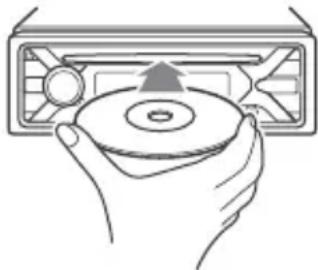
BiTbOpEHn po3NoHcBcA BtOMaTuHo.
BiTbOpHn npncToIO USB
Y ciinHCTpyKci 3 ekcnnyataci «iPod» BnKOpNCTOBycTbcra JK 3aRaIbHe NocnlaHna Ha ynKci iPod npncTpoIB iPod i iPhone, Raio B TeKti a6o Ha iIOCTpaizx He Bka3aHO iHwe.
Uo6 OtpMaTn DoKlaDHi BiDomocTi npocymicHicTB iPod, nVB. «Ipo iPod» (cTOp. 16) a6o BiDbIaIte Be6-caT cIyX6nPiIDTpIMKn, 3a3HaueHn Ha oCTaHHi CTopIHci O6KlaDInHKn.
Mokytb BnKOpncTOBvBaTnc npncIPOi USB* Tniv AOA (Android Open Accessory) 2.0, MSC (npncIPOi-HakOnuYBaui) i MTP (npotokol nepeaqui MylbTuMeia), cymichi 3i cTaHApToM USB. 3aJekHo BiD Tnuy npncIPOU USB ha anapati moxHa Bn6paTn peXm Android a6o MSC/MTP. Ira deAknx MoJeNei uΦpoBnx Pneepib a6o cMaprfoHIB 3 OC Android moKe 3HaIObntncpeXm MTP.
- HapnKnaD, ΦJIeW-HaKoNHyBaU USB, ζιΦρOBιn Πηερ, cMapτΦοH 3 OC Android
Pnmuitkn
-Дя OТрманнЯ DOKlaHnx BiDOMocTe npCymichictb npictpoU USB nB. Be6-caNT NiIITpIMKn, 3a3HaueHn Ha octaHHi CTOpIHcI O6KlaDNHKn.
CmapTfoHn 3 iHCTaIbObaHOIO OC Android 4.1 a6o HOBIOWI Bepcii niTpumyOTb npToKoJ Android Open Accessory 2.0 (AOA 2.0). Ipote deRKi cMapTfoHn MOxTyHe NOBHCIO niTpumyBaTu AOA 2.0, HabITb JkUO iHCTaIbObaHO OC Android 4.1 a6o HOBIWY BepciIO. Ira OTpIMAHNJaOKlaadHnx BiOMOCTei npocymichCTb BaWoTO CmapTfoHy 3 OC Android nB. Be6-caTI niTpUMKn, 3a3HaueHn Ha ocTaHHi CTopinCi o6KnaDNHKn.
BjTbOpHnHaBeJeHnx HxKHe paJiIB He NiTpMByeTbcra. MP3/WMA/FLAC:
- aJIn, 3axnueHi abTopcbknm npaBaMn;
-ФaIIM3DRM(KepyBaHHNcHΦpoBmnpaBamn); - 6araToKaHaJIbHi ayIioΦaIJN. MP3/WMA:
-ФаниЗКOMпессio6e3ВТpaTиДаннx.
Ipeed CTBOpEHnM nIDKIOueHnBn6epiTB peKm USB (peKm Android a6o MSC/MTP) 3aJexHo BiD TIny npicTpoU USB (ctop.13).
1ПiДКЛЮчITь npистри USBdo nopTy USB (ctop.6).
P03noHETbcB iDtbOpEHn.
Ku npicpti USB Bxke nikluoyeHo,
I NaOATy BiTBOpEHnHaTnCKaTe
KhoNky SRC,IOKN He BiO6pa3ntbCn
iNDkaia [USB] (kUpo po3ni3HaHO iPod, 3'ABtbcn iNDkaia [IPD]).
2 BiDperyIIOTe rUHicTb Ha Ubomy anapati.
Pn3ynnHeHHBiDtBopeHH
HaTnCHiB i yTpmyTe KhONky OFF npotraom 1 cekyHn.
BvdaJIeHn npncTpoI
PpnnHItb BiITBOpEHn Ta BnDaJIitb npucTpii.
3aTepeXeHnIЯ iPhone
Y pa3i niKluoyenHЯ iPhone uepe3 USB rHyHicTb TelefoHHx BnKlnkIB peryIIOCTbcra 3a donomoroio iPhone, a He 3 npncTroO. NiJ yac TelefoHHoI po3MOBn yHnKaIte BnnaKOBOrO NiDnUeHnRAyHOCTi Ha npcTpoI, ockIbKn ce moKe npn3BeCTn Do paNTOBoI 3mHi rYHoCTi 3ByKy NiCJIaKHeHHra po3MOBn.
FW UPDATE (OHOBJIeHHB6yIOBaHOro 13)
3aynck OHOBneHnBbYIOBaHOro I3: [YES], [NO].
OHOBHeHH B6yDObaHOro I3 TpNBac KJIbKa XBnInH. PId qac OHOBHeHH He nepeBODbTe 3aMOK 3aJaIeHH B PNOJKeHH OFF i He BiD'EDHyIe npucTpi USB.
HajauTyuBaHHa 3Byky (SOUND)
EQ10 PRESET
Bn6ip kpiBoi ekBaIaJ3epa 3 10 KpNBx ekBaIaJ3epa a6o BmKHeHHeKBaIaJ3epa:
[OFF], [R&B], [ROCK], [POP], [HIP-HOP], [ELECTRONICA], [JAZZ], [SOUL],
[COUNTRY], [KARAOKE]*, [CUSTOM].
Hactpoikn Kpnboi ekBaIaI3epa MoXHa 36epertn IJRA KOxHOrO DKepeJa.
*Kuio Bn6paho [KARAOKE], 3Byk rOIoCy niUac BiTbOpEHn npurnyuYcBcA, aJe He yCyBaETbc NOBHCTIO. BuKOpNCaHHa MIkofoHa He NiITpMMyETcbr.
EQ10 CUSTOM
YcTaHOBJIeHHn[CUSTOM]3EQ10.
HaiauTyBaHnKpBBoi eKbAaJ3epa: [BAND1] 32 Γu, [BAND2] 63 Γu, [BAND3] 125 Γu, [BAND4] 250 Γu, [BAND5] 500 Γu [BAND6] 1 KΓu, [BAND7] 2 KΓu, [BAND8] 4 KΓu, [BAND9] 8 KΓu, [BAND10] 16 KΓu. Pibehruynocti peylnoeTbcra B diana3c BiD-6 DDo+6 DIs 3Kpokom B 1 D.
BALANCE
PeylIOBaHHa 3ByKOBOO 6aJaHcy: [RIGHT-15] - [CENTER] - [LEFT-15].
FADER
PerylIOBaHHB BIDHOCHOROp iBnH: [FRONT-15] - [CENTER] - [REAR-15].
S.WOOFER (ca6ByΦep)
SW LEVEL (piBHeH ca6ByΦepa)
Perynobannpibnryuhocti ca6Byepa: [+6dB] -[0 dB]-[-6 dB].
([ATT] Biö6paKaεTbC8 3a HaɪHnXyOrO 3HaueHHra.)
SW PHASE (a3a ca6Byepepa)
Bn6ip a3n ca6Byepa:[NORM],[REV].
LPF FREQ (aactota dna iNbTpa Hn3bKnx aactot)
Bn6ip rpaHnUHOJ uactoTn ca6Byfepa: [80Hz], [100Hz], [120Hz].
Bn6ip i3-nomix 15 nonepeHbO BCTaHOBJeHNX KOJbOpiB, 1 HanaTObAHN KOJip.
CUSTOM-C (HanaTobAHn KOJIp)
Peectraia HanaustobaHoro KOIbOpy InKHONoK.
RGB RED, RGB GRN, RGB BLUE
PerynboHaHn iana3OH KOIbOpy: [0] - [32] (3HaueHHa [0] He MoXHa
BCTaHOBtN IJIa BCIX Iiapa3OHIB KOJIbOpy OJHOuacHO).
DSPL-C (KoJip dncnne)
Pn3HaeHHnonepeHbO
BCTaHOBJIeHOro a60 HanaIaTOBaHOrO KOJIbOpy IINIcPJIe.
COLOR
Bn6ip i3-nomixk 15 nonepeHbo
BCTaHOBJIeHx KOJIbOpI, 1 HanaTObAHn KOJIip.
CUSTOM-C (HanaTobAHn KOJIp)
Peectraia HanaawToBaHoro KOnbOpy InnaIncnJe.
RGB RED, RGB GRN, RGB BLUE
PerynboaHn iana3OH kOlbopy: [0] -
[32](3HaueHHa [0] He MoXHa
BCTaHOBnT nIy BCix Iiana3OHiB
KoIbOpO OAnHOaCHO).
SND SYNC (cHxpoHiaui 3Byky)
YBIMKHeHHa CnHxpoHiaui niDCbiyBaHHa 3i 3Bykom: [ON], [OFF].
AUTO SCR (aBtOMaTnUHa npOKpyTkA)
AByomatnHOpnpKpyyEIOBri eJeMeHTn:[ON],[OFF].
Texhichne 06cnyroByBaHHa
UHHeHHa KOHTaKtIb
Pnncpti moKe npaHOBaTu HeHaJeXHM
YHOM y BnPaKy 3a6pydHeHHa KOHTaKTIB,
Uo 3^ dHyOt b npcTpi i nepeHNIO naHeJIb.
Uo6 3anobiru cBomy, BiD'eHaIte
nepeHIO naneJb (CTop.5) i npouNCTbTe
KOHTaTKBaTHm TaMnOHom. He
doKlaJaaiTe HaMpHnx 3ycnJIb. B iHOMy
pa3i MOxHa NOxKOJNTN KOHTaKTN.
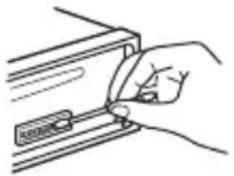
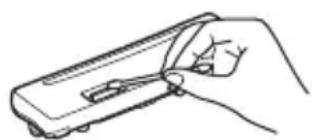
Pnmuitkn
3 MipkyBaHb 6e3NeKn BmNkaTe 3anaJIIOBaHH Ta BmMaIte KJIIOU i3 3amKa 3anaIIOBaHH nepei HJUeHHaMKoHTaKTIB.
Hikon He TopkaTecKa KOHTaKTIB 6e3nocepHbO nablqMn a6o 6yNb-ram MeTaJIeBm npedMeTOM.
TexhihixapaKTepeNTnKn
Tiohep
FM
Диаэзн НастpoюВань:
Для napametpa [AREA] BCTaHOBJIeHo 3HaueHnE [EUROPE]:
87,5 MΓι - 108,0 MΓι
Для napametpa [AREA] BCtahOBJIeHo 3NaueHnra [RUSSIA]:
FM1/FM2:87,5 MΓι - 108,0 MΓι (3 iNtepBaJOM 50 κΓι)
FM3:65 MΓι-74 MΓι (3 iHTepBaIOM 30 KΓι)
Hizdo aHTehn:
3'€nHyBaayIJIa 3OBHiHbOi aHTeHN
Pomixkha yactota:
Для napametpa [AREA] BCtaHOBJIeHo 3HaueHnE [EUROPE]:
BnKOpncTObYaHa ChyTnBiCtB: 7 DΦ
Bn6ipkoBicb:75Db npn 400K
BidnoHenncHnA/73d6
Po3dileHHa:50 nHa 1 KΓ
YacToTHa xapaKTepeNtka: 20 T-15000 T
MW/LW
Диаэон HabtpoIBaHHa:
MW: 531 kT - 1602 kT
LW:153KΓu-279KΓu
THi3I0 aHTeHn:
3'εДнУВач ДЯ 30ВишьоI aHTeHn
YyTnBicTB:MW:26MKB,LW:50MKB
PporpaBau CD
BidnoeHHcunHaJ/um:95d6
YactoTHa xapaKtepeNtka: 10 T-20000 T
KoephiIeHT DeToHaIe: No3a BmIpOBAHUMM MekamN
MaKcImMaJIbHa KJIbKICtB (JInUe CD-R/ CD-RW):
- nanok (aIb6omIB): 150 (y TOMy uNcJI KopeHeBa nAnKa);
(πiTpmyetbca VBR (nepeMiHa
WBnKicTb nepaui daHnx)
YacToTa nnckpeTn3aui: 16 Kt48Kt
WMA (.wma)
UWBnKicTB nepeaui daHnx:
(πiTpmyetbycVBR(nepemiHa
TepmiHaayiobxOiB (REAR, SUB)
AHTeHa 3 eJIeKtpnHm npuBOdom/ TepMiHaI KepyBaHHaPiCnIbOaem nOtJxHocTi (REM OUT)
Bxo:
BxidHn TepmHaI pylbTa
akymyIaTOP noCTiHoro Ctpymy
Ha npyro1o 12 B (i3 3a3eMneHnMa H eratNBHOKOHTaKTy)
HomHaJIbHe cNoXnBaHnCtpyMy: 10 A
Pozmipn:
πρι6π.178 MM×50 MM×177 MM (U/B/r)
MoHTaXHi po3Mipn:
πρι6π. 182 MM × 53 MM × 160 MM (ω/B/Γ)
Bara: npn6n.1,2 kr
KOMnJIeKT nOCTaHaHHa:
OchOBHn npncTpi (1)
YactHHJ BCTaHOBJeHH Ta
BiDcyTHi3ByKOBn CnRHaI.
→ΠДКЛЮЧЕН ДОДАТКOBИ NIDСИЛЮВач NOTУЖHOCTI, a B6yIDOBAHN NIDCSIIJOBAV He BNUKOPNCOTOBYETbCRA.
KhoNkOnepaui He yHKciOHyOTb. DnCK He BnMaetbcra.
→HaTnCHiB i yTpmyTe KhoNk DSPL i (Ha3aD)/MODE doBwe 2 cekyH, zo6 nepe3aBaHTaxKHT npncptiB. Bmict, 36epeXeHn y naM'atI, 6yde cTePto. 3 mipkyBaHb 6e3neKn He BVkoHyte onepaio nepe3aBaHTaxKeHHn iD vac KepyBaHH aBTOMo6iJem.
Papionpniom
He npnMaIOb8c nRHaHn paioctaHci. 3ByK cynpoBODxkyETbc8 yWMamN.
HenpaBnIbHe niiKJIIOUeHHa.
- IpepeBipTe πiДКЛIOUeHHaBTOMO6IbHOI aHTeH.
-Якшо abTomatnuHa aHTeHa 3 eJekTpHnM npuBOdom He BucyBaTbcra, npeBipTe NiKIOUeHHa npoBOdy KepyBaHHa aHTeHOIO 3 eJekTpnpuBOdom.
He Bdaetbcra 3HaHTn 3anporpamOBaHi cTahci.
TpaHcIbOBAHn CnHaJ HaTo Cna6Kn.
Y diaana3oHi FM3 HEMOxKlnBO HaCTpoiTn 74 M74
→Для [AREA] Вибрано [EUROPE].
-YctaHOBIbIb [AREA] 3HaueHnRA [RUSSIA] (cToP.12).
RDS
He npimmaotbca nocnyr RDS (KoIy I na napameTp a [AREA] BCTaHOBJeHo 3NaueHnra [RUSSIA]).
→ Bn6paHo FM3.
-Bn6epiTb FM1 a6o FM2.
PocnyrRDS HeIOCTyNHi B NToOHMy perioHi.
PicnK kInbKOx cekyHd npocnyxOByBaHHa3anyckaetbc4yHKciA SEEK.
→ CtaHciHa e Tp-ctaHciEIO a6o TpaHcIIOe Cna6Km CnHaN.
-BnMkHiTbTA(ctop.8).
Hemae nobidomneneh npo nnotouhy cntyaio Ha doporax.
YBiMKhItbTA (CTop.8).
→ CtaHciHa He TpaHcIIOe NOBIOMJeHHa npo nOTouHy cHTyaUHO Ha DOporax, He3BaXaIOuHa Te, 10 e TP-CTaHciEIO.
- HanaTnyTe iHwy cTaHcio.
PTY Biio6paKaε[-- - - - - - -].
→ ItoTuHa cTaHcIa He e RDS-cTaHciEIO.
He oTpmaHo daHnx RDS.
→ CtaHciHa He Bka3yE Tnnppepaui.
Ha3Ba nporpamHoi nocJyRn 6JImaE.
→ДяцiCiCTaHciI HeMa€ aIbTePHaTnBHOI qactOTn.
- HaTnCHiB SEEK + / - ,KoJI N6JIIMaE Ha3Ba nporpaMHOI NOCLyRn. 3'ABNTbcr NOBIOMLeHnR [PI SEEK], i npucTpii NOUHe WyKaTu INuY UaCTOTy 3 TaKUMcAMmN daHmN PI (nporpaHa iDeHTnΦiKaui).
BiodtbopeHnC
He BiTbOpIeTbcIaNcK.
→ДиckpoWkoJxHenna6o3a6pydHeHn.
→ДиСКИ CD-R/CD-RW He npn3HaueHi IЯ BiIbTBopeHnHa 3ByKy (CTop.16).
HemoxJINBO BiTbOpTuN paJn MP3/WMA.
→ДиCK HeCyMiChn i3 ФopMaTOM i BepciEIO MP3/WMA.ДoklaHHi BiOmoCTi npo BiIbTOBIOBaHI DiCKN Ta ФopMaTn HabeDiHi Ha caTi NiItpmKn, 3a3NaYeHOMy Ha OCTaHHi CTOpIHcI O6KlaDInHKn.
Фаилmp3/WMA notpe6yotb 6ilbwe acyДЯ NOATKBy BIDTBOPeHnH, HIX iHwi.
HabeHHi HnKHe DnCKn Notpe6yIOTb 6JIbWe yacy dIra NooyaTKy BiTbOpeHHr:
-ДИСК,ЗАПИСАНМ 3i CКlaДНОCTPyKТуPoI O DepeBa ФайлIB;
-ДиСК,ЗлпсаниуpeхиMi Multi Session;
-ДИСК,HaЯкNi MOxHaДОДaВaTиФаЛn DaHnx.
3Byk nepeepBaetbcra.
→Диck noWkoJxHn a6o 3a6pydHeHn.
BvdbopeHn3 npncpou USB
He BiIDTBOPIOITbCRA eIeMeHTn Upe3 KOHcEHTpaTOp USB.
→Пистpoю He ВдаeТься рОзпэн npистри USB черз концentpaTop USB.
HUB NO SUPRT: uei npicpii He niTpmye KOHcHTpaTOpn USB.
INVALID
→Bn6paHa onepaizj MoKe He NiIITpIMyBaTncr.
Пдчac BiДТВОреня iPod 3mInTu [USB MODE] HeMoXJIuBO.
IPD STOP: BiTbOpEHn3 iPod 3aBepSeHo.
Po3nouHiTb BiIbTOpeHHa 3a IOnOMoIO iPod/iPhone.
NO AF: BiIDcyTHi aIbTepHaTINBHi YaCTOTn.
→ HaTnCHiTb SEEK + / - , KOJI N 6JIIMaE Ha3Ba nporpaMHOI NOcLyr. PnpCTpiN noUHe WyKaTu INuY uactOty 3 TaKIMn CaIMN daHIMN PI (iJeHTnΦikaizj nporpaMn) (3'ABITbcr NobIDomLeHHra [PI SEEK]).
NO TP: BiCyTHi nporpaMn npo cnTyauio Ha doporax.
BnKOpncTaHnI npoBoIOBOrO nylbTa IInCTaHciHOrO kepyBaHHa
1Lio6 aKTHyBaTn npoBOIOBn nyIbT nCTaHciHoro KepyBaHHa, yCTaHOBIT b [STR CONTROL] y [SET STEERING] 3HaueHHa [PRESET] (cTOp.12).
YCTaHOBJIeHHJ
Bid'cHaHHaXnCHOi MaHKeTNa KpoHsTeHa
IpeyUcTaHOBHeHHm npnCTpoo BiEHaTe 3axncHy MaHKeTy ③ Ta KPOHHTeH ① BiD npnCTpoIO.
13axonitb obuBa kpaia 3axnchoi MaHKeT N ③ BNTaRHTb ii.
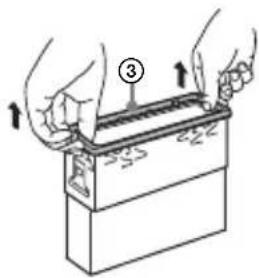
2 BCTaBTe pa3oM o6nDbA deMoHTaXHi KJIouci ② Do KnaCaHn. NotarHITb KPOHtEnH ① DOHN3y, a NOTIM NotarHITb npunctpii Doropn, 0o6 Bi'EDHaTn NOrO.
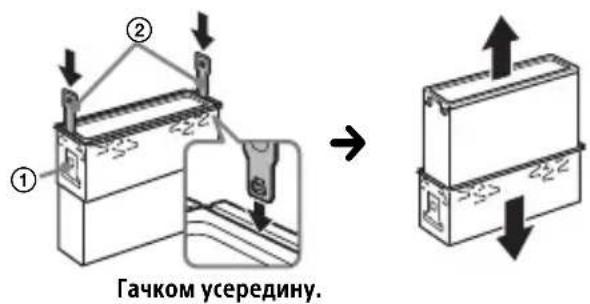
YcTaHOBLeHnI npNCTpOu B nAneI npNlaIb
Ipepe yctaHOBneHHn mpekeHauTecra, 10 oikcaTopn 3 06ox cToPiH KPOHHTeHa ① 3irHyTO BCEpeDnHy Ha 2 MM.
1 YcTaHOBITb KPOHHTeH ① y naHeJIb npIaIb, a NOTIM BnHITb BNCTyNn Ha3OBHI, 06 3a6e3neuTn ⅢJbHy ikcaizio.
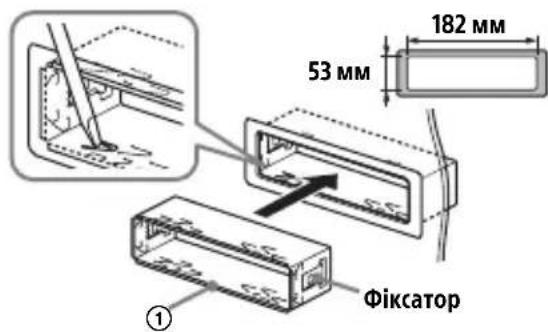
2 Ппсднайтппстрий Кроншту ①, a NOTIM BCTaBTe 3axnchy MaHxkety ③.
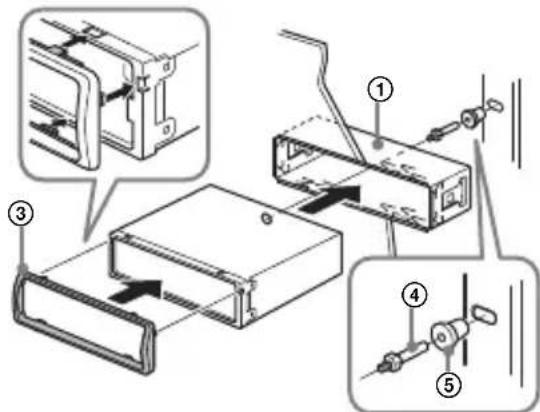
Ppimitkn
- JKIOΦikCaTopu BUNpRmIeHi a60 3irHyTi Ha3OBHni, npncTpii He 6ynde BCTaHOBJIeHn HAnExHHM YHOM iMOXe BUNaCTN.
- PepekoHaTeC, 4 fikCaTOp Ha 3axnChi MaXKeTi ③ HaleKHM YHOM BCTaHOBJeHi B OTBOpN, HABHIB anapati.
Bid'εdHaHNaT Ta npEaHaHHa nepeDhboi naHei
Hereby, Sony Corporation declares that this equipment is in compliance with Directive 2014/53/EU. The full text of the EU declaration of conformity is available at the following internet address: http://www.compliance.sony.de/
Eesti Keel
If you have any questions or for the latest support information on this product, please visit the web site below:
Site d'assistance
Register your product online now at:

- FM/MW/LW Compact Disc Player
- Made in Thailand
- CE
- Notice for customers: the following information is only applicable to equipment sold in countries applying EU Directives
- Disposal of waste batteries and electrical and electronic equipment (applicable in the European Union and other European countries
- with separate collection systems)
- Warning if your car's ignition has no ACC position
- Disclaimer regarding services offered by third parties
- Table of Contents
- Getting Started
- Listening to the Radio
- Playback
- Settings
- Additional Information
- Connection/Installation
- Guide to Parts and Controls
- Main unit
- ALBUM /
- EXTRA BASS
- AUX input jack
- DSPL(display)
- USB port
- Detaching the Front Panel
- Caution alarm
- Attaching the front panel
- Resetting the Unit
- Note
- Setting the area/region
- Setting the Clock
- Connecting a USB Device
- Connecting Other Portable Audio Device
- To match the volume level of the connected device to other sources
- Storing automatically (BTM)
- Tuning
- Storing manually
- Receiving the stored stations
- Using Radio Data System (RDS)
- Setting alternative frequencies (AF) and traffic announcement (TA)
- To store RDS stations with the AF and TA setting
- To receive emergency announcements
- To adjust the volume level during a traffic announcement
- To stay with one regional program (REGIONAL)
- Local Link function (UK only)
- Selecting program types (PTY)
- Type of programs
- Setting clock time (CT)
- Playing a Disc
- Playing a USB Device
- Notes
- Searching and Playing Tracks
- Repeat play and shuffle play
- Searching a track by name (QuickBrowZerTM)
- Searching by skipping items (Jump mode)
- Canceling the DEMO Mode
- Basic Setting Operation
- To return to the previous display
- General Setup (GENERAL)
- AREA
- DEMO (demonstration)
- CLOCK-ADJ (clock adjust) (page 6)
- CAUT ALM (caution alarm)
- BEEP
- AUTO OFF
- STEERING
- CUSTOM
- PRESET
- EDIT CUSTOM
- RESET CUSTOM
- USB MODE
- REGIONAL
- FIRMAWARE
- Sound Setup (SOUND)
- EQ10 PRESET
- EQ10 CUSTOM
- BALANCE
- FADER
- HPF FREQ (high pass filter frequency)
- AUX VOL (AUX volume level)
- Display Setup (DISPLAY)
- DIMMER
- BRIGHTNESS
- BUTTON-C (button color)
- COLOR
- DSPL-C (display color)
- SND SYNC (sound synchronization)
- AUTO SCR (auto scroll)
- Updating the Firmware
- Precautions
- Moisture condensation
- To maintain high sound quality
- Notes on discs
- Notes on CD-R/CD-RW discs
- Playback order of audio files
- About iPod
- Maintenance
- Cleaning the connectors
- Specifications
- Tuner section
- FM
- CD Player section
- USB Player section
- Power amplifier section
- General
- Copyrights
- libFLAC
- Troubleshooting
- No sound or the sound is very low.
- No beep sound.
- The contents of the memory have been erased.
- Stored stations and correct time are erased.
- During playback or reception, the demonstration mode starts.
- The display disappears from/does not appear in the display window.
- The display/illumination flashes.
- The operation buttons do not function. The disc will not eject.
- Radio reception
- Stations cannot be received.
- The sound is hampered by noises.
- Preset tuning is not possible.
- MHz to 74 MHz in FM3 cannot be tuned in.
- RDS
- RDS services cannot be received (when [AREA] is set to [RUSSIA]).
- The SEEK starts after a few seconds of listening.
- No traffic announcements.
- PTY displays [- - - - - - - - ].
- Program service name flashes.
- CD playback
- The disc does not play.
- MP3/WMA files cannot be played.
- MP3/WMA files take longer to play than others.
- The sound skips.
- USB device playback
- You cannot play items via a USB hub.
- A USB device takes longer to play.
- The sound is intermittent.
- Audio file cannot be played.
- Operations for skipping an album, skipping items (Jump mode), and searching a track by name (QuickBrowZer) cannot be performed.
- The sound cannot be output during playback in Android mode.
- Messages
- INVALID
- NOT SUPPORT -Android MODE
- For steering wheel remote control operation:
- Cautions
- Note on the power supply lead (yellow)
- Mounting angle adjustment
- Parts List for Installation
- Connection
- Making connections
- To the car's speaker connector
- To the car's power connector
- Subwoofer Easy Connection
- Memory hold connection
- Speaker connection
- Power connection diagram
- Common connection
- When the positions of the red and yellow leads are inverted
- When the car without ACC position
- Using the wired remote control
- Installation
- Removing the protection collar and the bracket
- Mounting the unit in the dashboard
- Detaching and attaching the front panel
- Fuse replacement
- Raccordement/Installation
- Attention
- Eindversterker
- OTka3 OT OTBETCTBEHHOCTN B OTHoWeHn ycIyr, npeDoCTaBJaEmbIX CTOpOHHMn NOCTaBzIKamN
- Copepkanhe
- Haualo pa60tbl
- PpocnyuBauHne paNo
- Bocnpon3BeDeHne
- YcTaHOBka Yacob (CT)
- Понск и Воспpon3ВeДeне КомпоЗиць
- Iobtophoe Bocnpon3BeJeHne IN BOCpON3BeJeHne B ClyuahHOJ NocledoBaTeIbHoCTN
- ПОИСК KOMПОЗИЦИ NO Ha3BaHиЮ (Quick-BrowZer™)
- Ppimechnna
- HactpoikKa 3Byka (SOUND)
- Приимechи OTHOCHTeIbHoДИСКOB
- Popraok Bocnpon3BedeHnaaynOaIIOB
- Cbeheny o6 iPod
- YxOД 3a yCTpoIcTBOM
- UHCTKa KOHTaKTOB
- PpimMeaHnA
- TexhnuceknexapakTepnCTnKn
- TIOHEP
- YcJIInTeJIb MoUHOCTH
- 067aHnΦopMaun
- Abtopckne npaba
- He cIbIweH 3ByKOBoCnHaJI.
- YdaJIeHbI daHHbIe n3 naMaTn.
- Bo BpemBocnpOn3BeDeHnI nn npneMa NaHHaETcA DEMOHCTpaun.
- Ipona/He OTo6paXaeTcNnDnKaunB OKoUke DnCnJe.
- He pa6oTaOT KHOJKN ynpaBJeHn. Nsck He n3BJIeKaTcra.
- PpneM padnoctaHcN
- He ydaetc npnHraTb paNocTaHcnn. 3Byk copboxoKdaeTc nomexamn.
- He ydaetc BbInolHnTb npedBapnteIbHyo HacTroky.
- B dnaana3oHe FM3 He ydaCTcHacTpOuTb 65 Mf-74 Mf.
- He ydaetc npnHryb ycnyr RDS (korda dIy napameTp a [AREA] 3aDaHO 3HaueHne [RUSSIA]).
- Iocne HeckoJIbKnx CeKyHd npocnyuBaNn BkJIouaetcA yHKunr SEEK.
- DopoxKhble coo6ueHn He nepeaotcra.
- Ipn BkIIOueHn FyHKcunn PTY oTo6paXkaeTc nHdNkaun [---].
- Ha3BaHne nporpamMHOyCnyr MmraeT.
- Bocnpon3BeDeHne AnckOB CD
- KomnaKT-ДИСК He BOCPON3BOJNTc.
- HeBo3MOxHOBocpOu3BecTnΦaJIbI MP3/WMA.
- PpmeHnno pa6ote npbTa dntaHnOHHO npabHeHa pyle
- YctaHOBKa/NoDKJIIOUeHne
- BHMaHne!
- MepbI npedoctopoXHOCTN
- PnmeaHne OTHocnteJbHo npoBoda nTaHna (KeJtbi)
- Peynilpobka yrna yctaHOBKn
- Ipeuehb deTaJe dJa yCTaHOBKn
- Поклоченье
- YcTaHOBka CoeHHeHn
- PpoclyxOByBaHHpaio
- BiodbopeHn
- Hanaштуваимя
- Доаткови BiIDOMOCTI
- LnΦpOBI KhoNKn (1-6)
- ALBUM▼/▲
- (NOBTOPUTn)
- (BBnnaKOBn nopAdoK)
- II (biTbOpHn/nay3a)
- BxIDhe rHizdo AUX
- DSPL (ducnnei)
- NopT USB
- Ponatokpo60tn
- Bid'εdHaHnpeepHbOi naHeI
- PonepeJxkyBaIbHn cnrHaI
- PnEHaHnapeepHbOi naHeJI
- Ipee3aBaHTaxKeHn npncTpoU
- PnmiTka
- HanaatyBaHHKpaIHn/perioHy
- YCTaHOBJIeHHra roINHHnKa
- HanaHTyBaHHaJIbTepeHaTnBHNx YactOT (AF)i NobiOmJeHb npo cHTyaCiIO Ha doporax (TA)
- PerylIOBaHnryrUHoCTi nID yac orOloWeHHnI pO cnTyaucio Ha doporax
- Прийом odни epiohaьhoi nporpaMu (REGIONAL)
- Функця мicцeвoro paioomoblenna (tibkn y Benuko6pntahii)
- Bn6ip Tnib nporpaM (PTY)
- YctaHOBJIeHHra roHHHnka (CT)
- BiodtbopeHH
- BiodtbopeHnI ncka
- BiTbOpHn npncToIO USB
- Pnmuitkn
- Pn3ynnHeHHBiDtBopeHH
- BvdaJIeHn npncTpoI
- 3aTepeXeHnIЯ iPhone
- HajauTyuBaHHa 3Byky (SOUND)
- Texhichne 06cnyroByBaHHa
- UHHeHHa KOHTaKtIb
- TexhihixapaKTepeNTnKn
- MW/LW
- PporpaBau CD
- BiDcyTHi3ByKOBn CnRHaI.
- KhoNkOnepaui He yHKciOHyOTb. DnCK He BnMaetbcra.
- Papionpniom
- He npnMaIOb8c nRHaHn paioctaHci. 3ByK cynpoBODxkyETbc8 yWMamN.
- He Bdaetbcra 3HaHTn 3anporpamOBaHi cTahci.
- Y diaana3oHi FM3 HEMOxKlnBO HaCTpoiTn 74 M74
- He npimmaotbca nocnyr RDS (KoIy I na napameTp a [AREA] BCTaHOBJeHo 3NaueHnra [RUSSIA]).
- PicnK kInbKOx cekyHd npocnyxOByBaHHa3anyckaetbc4yHKciA SEEK.
- Hemae nobidomneneh npo nnotouhy cntyaio Ha doporax.
- PTY Biio6paKaε[-- - - - - - -].
- Ha3Ba nporpamHoi nocJyRn 6JImaE.
- BiodtbopeHnC
- He BiTbOpIeTbcIaNcK.
- HemoxJINBO BiTbOpTuN paJn MP3/WMA.
- Фаилmp3/WMA notpe6yotb 6ilbwe acyДЯ NOATKBy BIDTBOPeHnH, HIX iHwi.
- 3Byk nepeepBaetbcra.
- BvdbopeHn3 npncpou USB
- He BiIDTBOPIOITbCRA eIeMeHTn Upe3 KOHcEHTpaTOp USB.
- BnKOpncTaHnI npoBoIOBOrO nylbTa IInCTaHciHOrO kepyBaHHa
- YCTaHOBJIeHHJ
- Bid'cHaHHaXnCHOi MaHKeTNa KpoHsTeHa
- YcTaHOBLeHnI npNCTpOu B nAneI npNlaIb
- Ppimitkn
- Bid'εdHaHNaT Ta npEaHaHHa nepeDhboi naHei
- Eesti Keel
- Site d'assistance
Brand : SONY
Model : CDXG3200UV
Category : Car stereo